!"
#$
%
& '
()*!((+
$
& ,
-.
2
UNDP/GEF Danube Regional Project
Table of content
Abbreviations .......................................................................................................................................... 3
Executive Summary ................................................................................................................................ 4
Main Text ................................................................................................................................................ 5
Needs Assessment and Hardware Purchase on national level (2.4-1) ................................................. 5
Tasks ................................................................................................................................................ 5
Activities .......................................................................................................................................... 5
Outputs............................................................................................................................................. 5
Planning and Upgrading at Central Level (2.4-1)................................................................................ 6
Tasks ................................................................................................................................................ 6
Activities .......................................................................................................................................... 6
Outputs............................................................................................................................................. 7
Recommendations............................................................................................................................ 7
Project Webpage (2.4-1)...................................................................................................................... 9
Tasks ................................................................................................................................................ 9
Activities .......................................................................................................................................... 9
Outputs........................................................................................................................................... 10
Recommendations.......................................................................................................................... 10
Training Program (2.4-4)................................................................................................................... 11
Tasks .............................................................................................................................................. 11
Activities ........................................................................................................................................ 11
Outputs........................................................................................................................................... 12
Training Evaluation........................................................................................................................ 13
Further feedback and observations from training workshops ........................................................ 13
Recommendations.......................................................................................................................... 17
Support for TNMN, JDS and EMIS Database Harmonization (2.2-2).............................................. 18
Tasks .............................................................................................................................................. 18
Activities ........................................................................................................................................ 18
Outputs........................................................................................................................................... 18
Recommendations.......................................................................................................................... 18
Upgrade of the Danube Alarm and Emergency System (AEWS) (2.3-1) ......................................... 19
Tasks .............................................................................................................................................. 19
Activities ........................................................................................................................................ 19
Outputs........................................................................................................................................... 20
Recommendations.......................................................................................................................... 20
Annexes................................................................................................................................................... 1
2
UNDP/GEF Danube Regional Project
Annex 1: Hardware Purchase List ....................................................................................................... 1
Annex 2: Oracle Support Requests...................................................................................................... 1
Annex 3: ICPDR IS Overview............................................................................................................. 1
Annex 4: Summary of System Options ............................................................................................... 1
Annex 5: Access to items on DRP website.......................................................................................... 1
Annex 6: Training Program - List of Participants ............................................................................... 1
Annex 7: Training Evaluation Complete list of answers to open questions ..................................... 1
Annex 8: AEWS Application Concept ............................................................................................ 1
Annex 9: Presentation of AEWS Application.................................................................................. 1
Annexes
Annex 1: Hardware Purchase List
Annex 2: Oracle Support Requests
Annex 3: ICPDR IS Overview
Annex 4: Summary of System Options
Annex 5: Access to items on DRP website
Annex 6: Training Program - List of Participants
Annex 7: Training Evaluation Complete list of answers to open questions
Annex 8: AEWS Application Concept
Annex 9: Presentation of AEWS Application
Alexander Höbart
Final Report for Project Component 2.4 - ICPDR Information System
3
Abbreviations
AEWS............................. Alarm and Emergency Warning System
APC/EG.......................... Accident Prevention and Control Expert Group
AT................................... Austria
BA .................................. Bosnia and Herzegovina
BG .................................. Bulgaria
CS................................... Serbia and Montenegro
CZ................................... Czech Republic
DBAM............................ Danube Basin Alarm Model
DE................................... Germany
DRP ................................ Danube Regional Project
ECO/EG ......................... Ecology Expert Group
EMIS/EG........................ Emissions Expert Group
FP/EG............................. Flood Protection Expert Group
GC-MS ........................... Gas Chromatography Mass Spectrometry
GIS ................................. Geographic Information System
GSM ............................... Global System for Mobile Communications
HR .................................. Croatia
HU .................................. Hungary
ICPDR ........................... International Commission for the Protection of the Danube River Basin
JDS ................................. Joint Danube Survey
MD ................................. Moldova
MLIM/EG....................... Monitoring, Laboratory & Information Management Expert Group
PIAC............................... Principal International Alert Centre
RBM ECON/ESG .......... Expert Sub-Group on Economics within the RBM EG
RBM GIS/ESG............... GIS Expert Sub-group within the RBM EG
RBM/EG......................... Riverbasin Management Expert Group
RO .................................. Romania
S/EG ............................... Strategic Expert Group
SI .................................... Slovenia
SK................................... Slovak Republic
SMS................................ Short Message Service
TAR................................ Technical Assistance Request to Oracle Support
TNMN ............................ TransNational Monitoring Network
UA .................................. Ukraine
VIC................................. Vienna International Centre
4
UNDP/GEF Danube Regional Project
Executive Summary
This report gives an overview on the given tasks, taken activities and produced outputs for the project
component 2.4 "Support for Reinforcement of the ICPDR Information System DANUBIS".
The ICPDR Information System (DANUBIS) is installed at the Permanent Secretariat of the ICPDR
(Vienna). It provides a web-based infrastructure for sharing and publishing information (documents,
links, addresses, events, etc.), and has integrated databases for specific needs of the work within the
ICPDR (water quality, emissions, etc.).
The main achievements of the activities within this project component can be summarized as follows:
ˇ Users at the national level (mainly members of the Expert Groups) have received new
computer equipment to facilitate their work with the system
ˇ A regional and 11 national training courses were organized to improve the knowledge about
and further usage of the system
ˇ The server platform (hardware and software) was upgraded.
ˇ The system was further developed and extended with new features, for example customizable
email notification of new additions to the website
ˇ A webpage for the Danube Regional Project was set up
ˇ Databases for water quality and emissions were interlinked and extended
ˇ A new communication solution for the Danube Alarm and Emergency System was developed
and tested and is ready for operational use
Alexander Höbart
Final Report for Project Component 2.4 - ICPDR Information System
5
Main Report
Needs Assessment and Hardware Purchase on national level (2.4-1)
Tasks
ˇ Definition and assessment of needs (equipment and human capacities) at national level
ˇ Preparation of specifications for needed equipment and time planning
ˇ Organization and coordination of equipment installation
Activities
A survey on current hardware equipment and user's experience has been carried out in 2002 among
members of ICPDR bodies. The survey was sent out to 128 and completed and returned by 56 people
(44%). Based on the results, a prioritised list of hardware needs was compiled. The detailed purchase
list including the specification of a suggested standard configuration was finished in early December
2002.
Equipment (personal computer, monitor, and optionally printer and modem) was purchased for 37
users.
At the end of the purchase procedure, a short follow-up survey has been carried out at the end of
October 2003 to get feedback from the recipients:
ˇ 24 users (65%) have reported that they have received the equipment, it has been installed and
connected to the internet, is fully functional and satisfying the users' needs for work related to
the UNDP/GEF Danube Regional Project, activities of the ICPDR, and for purposes of overall
cooperation in the Danube region with a few exceptions.
ˇ 5 users (13%) have not received the equipment: the local distribution of the equipment for the
users in Ukraine was not finalised at the time of writing of this report.
ˇ 8 users (22%) have not replied to the survey.
A detailed list of purchased equipment for users is attached in Annex 1 of this report.
Outputs
ˇ Survey Report: Hardware equipment, Network connection tests and the users' experience with
computers, the internet and the ICPDR Information System, including recommendations for
preparation of training and further development of the system.
ˇ Online tool for connection speed tests and survey database are available for further use
ˇ Operational computer equipment for users at national level (see Annex 1)
Recommendations
ˇ Finalize distribution of equipment in Ukraine
ˇ If additional hardware or software is needed, the purchase procedure should be shortened
6
UNDP/GEF Danube Regional Project
Planning and Upgrading at Central Level (2.4-1)
Tasks
Strategic planning and updating of software platform for ICPDR Information System at the central
level
Activities
The survey mentioned in the previous section (Needs Assessment) also provided a basis for further
development of the system on the central level.
Several recommendations for the operation of the information system have been worked out in
cooperation with the ICPDR Secretariat (Institutional Setup, Facilitators, etc. - see outputs below).
The hardware platform of the information system was renewed to ensure availability and sufficient
capacities for the work with the system.
The software platform (Oracle Database and Oracle Portal) was constantly updated to be on the latest
available version in order to minimize bugs and security holes. This was done in close cooperation
with Oracle Support (see Annex 2: Oracle Support Requests).
New features, based on the results of the survey, have been implemented into the system.
Access Statistics of ICPDR website
Public
Internal
s
e
r
v
i
e
w
o
l
d
F
-
-
-
-
-
-
-
-
-
-
-
-
-
-
-
-
-
-
-
Week
Figure 1: Weekly folder access of the ICPDR website, grouped by public and internal users
Note: Internal users are users which have logged in to the system, which means that members of
ICPDR bodies are also included in the public users before they log in.
Alexander Höbart
Final Report for Project Component 2.4 - ICPDR Information System
7
Outputs
ˇ Outline of Institutional Setup of the ICPDR Information System
ˇ Draft concept "The Role of Expert Group Facilitators and National Facilitators in the ICPDR
Information System"
ˇ Information System Overview including recommendations for further improvements (see
Annex 3)
ˇ Summary of System Options, giving a guideline on the future platform strategy with particular
attention to the planned public website (see Annex 4)
ˇ Installed new hardware for web server -> faster working experience on website, enlarged
capacity (concurrent users)
ˇ Installed new operating system Linux -> more stable and reliable operation of the server
ˇ Changed database character set to Unicode (UTF8) -> support for all characters in the Danube
region
ˇ Upgraded Oracle Portal to latest available version of current release (Version 3.0.9.8.5)
ˇ Additional software on the web server for sending MIME mails (attachments)
ˇ New features:
o Improved navigation bar -> easier handling of website
o Additional search features (meta-search) -> more options in finding needed
information
o Customizable overview homepage -> better overview on newly added content
o Customizable email notifications for new items -> keep users up-to-date automatically
o Customizable email notifications for posts in discussion fora -> facilitate direct
communication between users
o Send files by email -> improve accessibility of large files
o All meta information of content viewable by users -> improved transparency
o Upgraded address book -> shared ICPDR contact list (emails, phone numbers,
addresses) including group mail and export functions (e.g. for serial letter)
o Several minor improvements for the event calendar, content management and user
management
o Access statistics on folder, user and group level available online -> in-depth
monitoring on usage possible
Recommendations
ˇ Reconsider the use of Oracle Portal as the platform for the system because of several
limitations which became obvious during the more intensive usage and development of the
system:
o dependency on slow or inappropriate response by Oracle Support,
o dependency on Oracle's market strategy (integration of Portal into Oracle Application
Server causing maintenance overhead, move from open to compiled code)
o lack of flexibility in customizing components (display of folders, search results, report
parameters) because of the wizard-based approach limiting the development and
design,
8
UNDP/GEF Danube Regional Project
o fixed site structure with folders, items and grouping by categories,
o Limited support for national languages: currently supported languages for the user
interface are Czech, German, Hungarian, Romanian, Slovak and English (and other
languages not relevant for the Danube region. Oracle has no plans to add more
languages.
o Instead of storing files in the file system, Oracle Portal stores them in the database,
creating additional complexity and hindering access by other common tools (e.g. anti-
virus software, FTP)
As an alternative, open source software which is widely used, based on open standards, freely
available and has a large user and developer community could be used. This would give more
independence and allow more flexibility in development and design of the Information System
(see also Annex 4: Summary of System Options).
ˇ Elaborate and make available guidelines for sharing information in the system (scope,
structure, obligatory meta-information) which can be easily followed by content providers and
provides end users with better orientation on how to find what, where and when on the web
site. Such guidelines can be formulated quite precisely for well-structured and often-used
categories of information (e.g. ICPDR documents, calendar of events, meeting documents,
addresses) and more flexible for other work related information (links to external information
sources, draft documents).
ˇ Elaborate and make available guidelines for other system-related procedures (e.g. how to
become registered user, policy of access privileges, termination of accounts, update
responsibilities, database maintenance)
ˇ Evaluate the role of Expert Group and National Facilitators
ˇ Establish pro-active support for the system
Alexander Höbart
Final Report for Project Component 2.4 - ICPDR Information System
9
Project Webpage (2.4-1)
Tasks
Set-up and management project web page
Activities
The project website was based on the platform of the ICPDR Information System to ensure a quick
setup and have an integrated system. The layout, structure, and functionality was developed in close
cooperation with the project team.
Consultants of the DRP were provided with user accounts which gave them access to the internal
working area of the ICPDR to have access to databases and working documents of the ICPDR Expert
Groups. With the same account they could use the internal working area of the project website for
sharing information within the consultant and project team.
The main focus of the project website is to make reports and other outputs of the project available to
the public. The internal area is rarely used. This is also reflected in the access statistics.
Access Statistics of DRP website
Public
Internal
s
F
o
l
d
e
r
v
i
e
w
-
-
-
-
-
-
-
-
-
-
-
-
-
-
-
-
-
-
-
-
-
Weeks
Figure 2: Weekly folder access to the DRP website, grouped by public and internal users
Note: Internal users are users which have logged in to the system, which means that members of
ICPDR bodies are also included in the public users before they log in.
10
UNDP/GEF Danube Regional Project
Access Statistics of DRP user groups
WWF
UBA
s
RODECO
RAMBOLL
MAKK
a
g
e
v
i
e
w
KTH
P
GFA Tera
Ecologic Group
Delft Hydr.
DRP Team
-
-
-
-
-
-
-
-
-
-
-
-
-
-
-
-
Weeks
Figure 3: Access by user groups of Danube Regional Project in 2003
The figure below shows the usage of the ICPDR Information System (both ICPDR and DRP parts) by
the user groups of the DRP (project team and consultant groups).
See Annex 5 for a list of the most requested folders and items on the DRP website.
Outputs
ˇ Website which is functionally integrated into ICPDR Information System (search, calendar,
tools for user and access privileges, content management tools)
ˇ Public website including general information on the Danube region and project-related
information
ˇ Internal working area for information exchange between consultants
Recommendations
ˇ Review website structure and content in regard to the planned public website of the ICPDR
ˇ Evaluate usage by and needs of internal users
Alexander Höbart
Final Report for Project Component 2.4 - ICPDR Information System
11
Training Program (2.4-4)
Tasks
Launch an extensive training program and organize a series of workshops at different user levels and
in different regions of the Danube River Basin in order to train and assist future users in the best use of
the tools made available by the system
Activities
A concept, training agenda, and a list of participants was developed in close cooperation with the
ICPDR Secretariat.
Extensive training material (presentations, online help, online tutorials, manual) was prepared.
As a start event, a training workshop for Facilitators of Expert Groups and National Facilitators was
organized in December 2002. During this meeting, the role of the newly introduced Facilitators was
also discussed (see also output from "Planning and Upgrading at Central Level (2.4-1)")
As a next step, a training workshop for the staff members of the Permanent Secretariat and the DRP
Team was organized in the VIC.
From March to November 2003, national user trainings for Expert Group Members and other experts
were organized in the Czech Republic, Moldova, Bulgaria, Bosnia & Herzegovina, Croatia, Hungary,
the Slovak Republic, Romania, Serbia and Montenegro, Slovenia and Ukraine (in order of date of
training).
The training covered the following topics
ˇ Objectives, Benefits and Basic Concepts of the Information System
ˇ Overview on the current content (documents, publications, databases) and functionality (e.g.
address book, calendar, discussion forum, personal settings)
ˇ Finding and retrieving information (searching for documents and querying databases)
ˇ Adding information (files, text and links)
A total of 108 users attended the training workshops. The table on the next page shows the distribution
of the participants among countries and Expert Groups.
A list of all participants of the training program is attached as Annex 6.
12
UNDP/GEF Danube Regional Project
RBM
Country APC/ ECO/ EMIS/ FP/ MLIM/ RBM/
RBM GIS/
EG
EG
EG
EG EG
EG
ECON/
ESG
ESG
S/ EG Others Total
AT
0
0
1
0
0
0
0
0
0
1
2
BA
1
1
1
0
1
0
0
1
0
2
7
BG
1
0
2
0
1
1
1
1
0
0
6
CS
1
1
0
0
2
0
0
0
0
8
12
CZ
1
1
1
0
2
0
0
1
0
1
7
DE
0
0
0
0
0
0
0
0
0
0
0
HR
1
3
1
1
1
3
1
2
0
4
17
HU
1
0
0
0
2
1
0
1
1
1
7
MD
1
1
1
1
1
1
1
1
1
0
8
RO
0
1
1
0
3
1
1
1
0
5
13
SI
1
0
1
0
2
0
0
1
0
1
6
SK
1
2
0
0
0
1
1
1
0
1
7
UA
0
0
1
0
1
0
0
0
0
7
9
PS, DRP
0
0
0
0
0
0
0
0
0
7
7
Total Sum
9
10
10
2
16
8
5
10
2
38
108
Table 1: Training Participation by Expert Groups and countries
Notes:
The total users can be less than the actual row sum, because one user can be member in several
groups.
In Austria and Germany, no national training was organized. The participants from Austria are
Facilitators.
The column "Others" includes Facilitators and Delegation Members
Outputs
ˇ User manual available as online help system and printed training support material
ˇ Animated tutorials for common tasks with the system available online
ˇ 3-day training workshop for Expert Group Facilitators and National Facilitators
ˇ 2-halfday training workshop for the staff of the Permanent Secretariat and the DRP Team
ˇ 11 x 2-day training workshops on national level
Alexander Höbart
Final Report for Project Component 2.4 - ICPDR Information System
13
Training Evaluation
After each training sessions, anonymous evaluation sheets have been filled in by the participants. The
ratings have been compiled in a table (see Table 2: Training Evaluation Sheets Overview, on the next
page).
The most often stated answer on the question about the most important part of the training was
"working with databases" or something similar referring to the part on Database Queries in Water
Quality, Emissions and other databases.
The most common recommendation was to include more practical exercises and work-related
examples.
The comments can be summarized that this training sessions were quite well appreciated as an
overview or introduction to become aware of the concepts, features and content of the information
system. Further training should be more focused, shorter, in smaller groups, and with a clear task and
immediate applicability in the work of the participants.
The complete list of answers to the open question is attached as Annex 7.
Further feedback and observations from training workshops
The training was also attended by participants which were not in the original list of participants,
mainly local experts on water monitoring and related issues. This indicates that there is also a real
interest in ICPDR activities by national experts which are not the official members of ICPDR bodies.
Several users asked for information on legislation, mainly related to the Water Framework Directive,
which is not available (or outdated) in the system. This and other content related suggestions have
already been stated by users during the survey - see Needs Assessment and Hardware Purchase on
national level (2.4-1) and the related output for more information on this.
During the training, ad-hoc feedback was given by several participants, which helped improving the
information system (see "Planning and Upgrading at Central Level (2.4-1)") and giving
recommendations for further training workshops.
The training also revealed some software bugs in the system, which existed before, but never have
been encountered or reported by users (see also Annex 2: Oracle Support Requests).
Fast internet connections are technically available in all visited countries. The reliability of
connectivity might still be a technical problems sometimes/somewhere. Another technical problem are
outdated firewalls which cause access problems. But the main problem related to access seems to be
not a technical but a financial one, i.e. the lack of budget or willingness of institutions/organizations to
provide good (and costly) internet connections to the users.
Users know from experience that they rather get current documents sent by email than to find them in
the system. Therefore, there is little incentive to visit the system. This results in rather low usage of the
website, which probably leads to the situation that documents are still distributed as email attachments.
It seems that this vicious circle can only be broken by a commitment by all involved users to use the
system as the main sharing platform for information related to the ICPDR.
14
UNDP/GEF Danube Regional Project
Rating (Median)
Workshop Title
Date
Location
Invited Partici- Evaluation Objectives Objectives Overall Partici- Methods Appli-
users pants Sheets
spelled out met
Quality pation
cability
Training for Facilitators
5-7 December 2002
Bratislava
19
18
17
94%
100%
4
5
4
4
User Training - ICPDR PS and DRP Team 24-25 February 2003
Vienna
9
7
4
100%
75%
5
4
5
4
User Training - Czech Republic
5-6 March 2003
Brno
12
6
5
100%
100%
5
3
4
4
User Training - Moldova
10-11 March 2003
Chisinau
7
8
8
100%
100%
5
5
5
5
User Training - Bulgaria
17-18 April 2003
Sofia
9
8
7
100%
100%
5
4
5
5
User Training - Bosnia and Herzegovina
20-21 April 2003
Banja Luka
10
7
5
100%
100%
5
3
4
4
User Training - Croatia
08-09 May 2003
Zagreb
17
17
14
100%
100%
5
4
5
5
User Training - Hungary
15-16 May 2003
Budapest
15
7
7
100%
100%
5
4
5
5
User Training - Slovak Republic
19-20 May 2003
Bratislava
13
6
4
75%
75%
5
4
5
5
User Training - Romania
26-27 May 2003
Bucharest
12
13
6
100%
100%
5
4
5
5
User Training - Serbia & Montenegro
18-19 June 2003
Belgrade
10
14
10
80%
100%
5
5
5
5
User Training - Slovenia
24-25 September 2003 Ljubljana
11
6
6
100%
100%
5
3
5
4
User Training - Ukraine
13-14 November 2003 Kiev
13
9
9
100%
89%
5
4
4
4
Total
157
126
102
Median
5
4
5
5
Table 2: Training Evaluation Sheets Overview
Alexander Höbart
1
5
o
r
k
s
h
o
p
?
"
a
r
k
:
e
s
t
m
e
e
t
i
t
s
p
r
e
d
e
f
i
n
e
d
o
b
j
e
c
t
i
v
e
s
?
"
i
t
h
5
b
e
i
n
g
t
h
e
b
e
s
t
a
n
d
1
b
e
i
n
g
t
h
e
l
o
w
i
c
e
i
n
t
h
e
t
o
t
a
l
s
e
r
e
t
h
e
o
b
j
e
c
t
i
v
e
s
s
p
e
l
l
e
d
o
u
t
a
t
t
h
e
b
e
g
i
n
n
i
n
g
o
f
t
h
e
w
o
r
k
s
h
o
p
f
u
l
l
y
m
o
r
k
i
n
g
c
o
n
t
e
x
t
?
i
d
t
h
e
w
:
e
r
e
d
y
e
s
t
o
"
W
v
e
r
v
i
e
w
a
t
i
o
n
S
y
s
t
e
m
h
o
a
n
s
w
e
r
e
d
y
e
s
t
o
"
D
e
r
e
s
c
o
r
e
d
b
y
t
h
e
p
a
r
t
i
c
i
p
a
n
t
s
w
I
n
f
o
r
m
R
h
o
a
n
s
w
D
P
v
a
l
u
a
t
i
o
n
S
h
e
e
t
s
O
o
t
r
a
i
n
i
n
g
s
e
s
s
i
o
n
s
,
t
h
e
y
a
r
e
c
o
u
n
t
e
d
t
w
i
n
g
c
r
i
t
e
r
i
a
w
e
t
h
o
d
s
a
p
p
r
o
p
r
i
a
t
e
?
p
o
n
e
n
t
2
.
4
-
I
C
o
m
r
a
i
n
i
n
g
E
r
o
j
e
c
t
C
e
t
:
p
e
r
c
e
n
t
a
g
e
o
f
u
s
e
r
s
w
a
s
t
h
e
l
e
v
e
l
o
f
p
a
r
t
i
c
i
p
a
t
i
o
n
?
a
b
l
e
2
:
T
w
e
d
i
a
n
)
:
t
h
e
f
o
l
l
o
w
v
e
r
a
l
l
q
u
a
l
i
t
y
o
f
t
h
e
t
r
a
i
n
i
n
g
o
w
e
r
e
t
h
e
t
r
a
i
n
i
n
g
m
h
a
t
i
s
t
h
e
a
p
p
l
i
c
a
b
i
l
i
t
y
o
f
t
h
e
t
r
a
i
n
i
n
g
c
o
n
t
e
n
t
t
o
y
o
u
r
w
O
H
W
W
e
p
o
r
t
f
o
r
P
o
s
t
f
a
c
i
l
i
t
a
t
o
r
s
a
t
t
e
n
d
e
d
t
w
ˇ
ˇ
ˇ
ˇ
i
n
a
l
R
o
t
e
s
o
n
T
s
m
b
j
e
c
t
i
v
e
s
s
p
e
l
l
e
d
o
u
t
:
p
e
r
c
e
n
t
a
g
e
o
f
u
s
e
r
s
w
b
j
e
c
t
i
v
e
s
m
a
t
i
n
g
(
M
F
N
A
O
O
R
16
UNDP/GEF Danube Regional Project
Weekly Access
Public
Training Workshop
Trainees
Other Internal Users
s
i
e
w
e
V
a
g
P
Week
Figure 4: Weekly access statistics for website (with training sessions indicated)
The figure above shows the page views of the ICPDR Information System during the year 2003.
The page views are separated into three groups:
ˇ registered users who participated in training (not only at the training sessions),
ˇ registered users not participating in a training and
ˇ public users (also includes registered users or trainees before they log in).
The training workshops are indicated in the week when they took place.
From this chart it is obvious to see that increases in page views were mainly due to the use of the
system in the training workshops.
An exception to this is the week 39, which also shows a big increase of usage by other registered users
this was due to the system being used in preparation of the RBM/EG Meeting which took place in
week 40 (about 2300 page views in this week by members of the RBM/EG). Also the peaks from
weeks 19-21 are due to increased access by all Expert Groups, other peaks in usage are mainly due to
increased activity in content publishing.
After each training session, the access by trainees goes down to a similar level as before. It could be
concluded from this data, that the training seems to have no significant quantitative effect on the
degree of further usage of the system. Of course, the qualitative effect cannot be judged by this
analysis.
Alexander Höbart
Final Report for Project Component 2.4 - ICPDR Information System
17
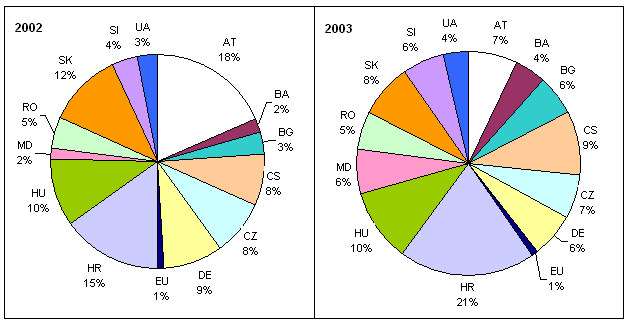
Figure 5: Share of website usage 2002 (Feb-Dec) and 2003 (Jan-Nov) by country's users
The pie chart above shows the distribution of users' access by countries in the period before and
during the training sessions (based on the country the user is representing, and not where the user is
located).
Recommendations
ˇ Allow access to technical ICPDR databases (EMIS, JDS, TNMN, Bucharest Declaration,
DABLAS) to all interested users by free registration
ˇ Temporary user accounts have been created for attendants not being official members of an
ICPDR body (20 users in the group Trainees). This list should be reviewed and accounts
converted into permanent ones with access to the ICPDR databases.
ˇ Further training should focus on specific tasks within the ICPDR work, and not on the system
and its features itself. This should make it more obvious for the users that the Information
System does not exist for its own purpose, but is a working tool which can help them with
many tasks (e.g. analyze water quality downstream of a specific emission source, sum up
emission loads on a sub-basin level, evaluate the effect of investment projects, compare
survey results with samples of permanent water quality monitoring). The participants should
therefore also be selected in relation to the specific task and not on a national basis.
ˇ Training is better digestible in smaller doses. Therefore, it might be appropriate to attach short
training workshop to other expert meetings. By organizing it in this way, the applicability to
the topic of the expert meeting can be made more obvious (see previous recommendation).
ˇ Increased usage of the system will also result in more feedback by the experts which is
important for the further development and integration, particularly of the databases. This
feedback loop between users and developers should be further cultivated.
ˇ See also related recommendations in "Planning and Upgrading at Central Level (2.4-1)".
18
UNDP/GEF Danube Regional Project
Support for TNMN, JDS and EMIS Database Harmonization (2.2-2)
Tasks
Assist and where necessary coordinate all project activities, which are related to the use of the
DANUBIS, in particular activity 2.2-2: Further development of databases EMIS / TNMN / JDS /
ARS, etc. and links with DaNUbs and MONERIS
Activities
ˇ Participation in the 1st Meeting of the Joint MLIM/EMIS Working Group
ˇ Consulting on the implementation concept of harmonization by the Rodeco Group
ˇ Improvement of user interfaces for the JDS, TNMN and EMIS databases taking into account
recommendations from selected experts
ˇ Presentation of a draft version of linked databases in the 2nd meeting of the Joint MLIM/EMIS
Working Group and
ˇ Upgrade EMIS Inventory database for import new datasets (Inventory 2002 having extended
list of pollutants with Priority Substances, link to TNMN stations)
ˇ Assistance in collection of data for the EMIS Inventory 2002 (modification of data collection
sheets and database import procedures, data evaluation)
Outputs
ˇ Extended and updated Emission Inventory with priority substances and link to TNMN
Monitoring Stations
ˇ Operational link from TNMN to EMIS database and vice-versa
ˇ Operational link from JDS to TNMN database and vice-versa (currently year 2000 of TNMN,
which is newest dataset) by matching River, River-km and determinand code.
ˇ Corrected and extended dataset of JDS biological database
ˇ Combined, more user-friendly search interface for chemical, biological and GC-MS parts of
the JDS database
ˇ All available on the website
Recommendations
ˇ Further integration of databases (e.g. TNMN determinands and EMIS pollutants list)
ˇ Further improvement of user interface and report customization based on feedback by users,
particularly TNMN and EMIS databases.
ˇ Integration of pan-European coding system into JDS Biological database
ˇ Review and improve data collection procedures for Emission Inventory and TNMN Database
ˇ More recommendations can be found in the Report of the Rodeco Group ("Preparation of a
proposal for connection/operational link of the data collected during the Joint Danube Survey
into ICPDR Information System, with particular attention to biological database", Project
Component 2.2)
Alexander Höbart
Final Report for Project Component 2.4 - ICPDR Information System
19
Upgrade of the Danube Alarm and Emergency System (AEWS) (2.3-1)
Tasks
Assist and where necessary coordinate all project activities, which are related to the use of the
DANUBIS, in particular activity 2.3-1: Reinforcement of AEWS communication solution through
DANUBIS
Activities
As a start, the current system documentation and other existing concepts for update were reviewed.
A decision-support paper for different upgrade options of the Danube Alarm and Emergency System
(AEWS) was provided for the 26th APC/EG Meeting on 26/27 September 2002. The APC/EG agreed
on option 2 (Integration of AEWS with ICPDR Information System).
Based on this decision, an application concept, including data, relational and functional models, was
prepared for, presented, discussed and accepted at the 27th APC/EG Meeting on 7/8 April 2003 (see
Annex 8).
Based on the refined concept and feedback from a subsequent questionnaire, the development of the
application was started. Additional hardware (GSM modem Siemens TC35) and software (SMS
Server Tools) was installed at the ICPDR web server.
In early July 2003, a prototype application was made available to all members of the APC/EG and to
PIAC staff members for testing the functionality of the standard forms and notification by email and
SMS.
At the 28th APC/EG Meeting on 8/9 September 2003, the further developed application was
demonstrated and discussed (see Annex 9).
Until the end of October 2003, an online manual has been provided, a module for calculating alert
thresholds was added and the reporting module was improved. The development of the application
was finished.
Main features of the AEWS application:
ˇ Messaging system for alert centers based on standard forms of the former system, including
automatic notification of recipients by email or SMS as defined by the users. The message
forms can be used to assess emissions, imissions and flow data, and enter causes of pollution,
counter measures taken, observed effects, and any additional non-structured information.
ˇ Default routing of messages depends on the type of message and the river (e.g. warning is sent
downstream, request for information upstream). This can be customized by the users.
ˇ Locations of incidents and water bodies are saved for later re-use in the system and for
integration with a GIS system
ˇ Integration with the Danube Basin Alarm Model: data used for the DBAM can be entered into
form fields or the DBAM data files can be distributed as attachments to a message.
ˇ Reporting: incident overview, messages overview and detailed messages list
ˇ Module for decision support on alert thresholds
ˇ The user interface and structured elements of messages (selection lists) are translatable in any
language (translations have been provided by Hungary, Moldova, Serbia and Slovakia so far).
20
UNDP/GEF Danube Regional Project
ˇ Integrated with ICPDR Information System (user management, address book, file upload,
discussion forum)
The APC/EG members or PIAC staff members of the following countries tested the system and
reported that it is working for them: Austria, Bulgaria, Czech Republic, Hungary, Moldova and Serbia
and Montenegro. In Bosnia and Herzegovina, Croatia, the Slovak Republic and Slovenia, some tests
have been carried out as well.
There have been no tests so far in Germany, Romania, and Ukraine.
Outputs
ˇ Detailed software concept web-based application for the AEWS with SMS and email
notifications approved by APC group (see Annex 8)
ˇ Implemented and tested web-based AEWS application (see Annex 9)
ˇ GSM modem and software for sending SMS installed at the web server - usable for any other
applications
Recommendations
The new AEWS application is ready for operational use. Before operating the AEWS, a user training
or workshop and a coordinated, full test of the system are recommended to ensure a common
understanding of the intended usage of the system. It is also recommended to nominate a person who
coordinates joint activities within the AEWS (e.g. regular test runs, configuration changes in the
system).
Alexander Höbart
Final Report for Project Component 2.4 - ICPDR Information System - Annexes
Annexes
Annex 1: Hardware Purchase List
Annex 2: Oracle Support Requests
Annex 3: ICPDR IS Overview
Annex 4: Summary of System Options
Annex 5: Access to items on DRP website
Annex 6: Training Program - List of Participants
Annex 7: Training Evaluation Complete list of answers to open questions
Annex 8: AEWS Application Concept
Annex 9: Presentation of AEWS Application
Final Report for Project Component 2.4 - ICPDR Information System Annex 1
1
Annex 1: Hardware Purchase List
Equipment
Feedback
Cntr. Name
PC LJ DJ Modem Inst. Conn. Operat. Satisf. Test Problems
BA HADZIABDIC Andja
X X X
X
Y
Y
Y
Y
Y
BA BEZDROB Aida
X X X
X
Y
Y
Y
Y
Y
BA KORAC-MEHMEDOVIC Azra
X
X
Y
Y
Y
Y
N
BG ANDONOV Svetoslav (PIAC09)
?
?
BG DIMITROV Dobri
?
?
BG MOLLOV Michail
X X
Y
Y
Y
Y
Y
CS IGNJATOVIC Jovanka (PIAC)
X
X
X
Y
Y
Y
Y
Y Monitor was damaged,
replaced under warranty
CS LEKIC Dejan
X X
Y
Y
Y
Y
Y
CS MILUTINOVIC Borisav Stevan
?
?
CS PETKOVIC Slobodan
?
?
CZ BERNARDOVÁ Ilja
X X
Y
Y
Y
Y
Y
CZ KUPEC Petr
X
X
Y
Y
Y
Y
Y
CZ NEDVEDOVA Doubravka
X
X
Y
Y
Y
Y
Y
HR BENIC-EINBÜCHLER Natasa
X
X
Y
Y
Y
Y
Y
HR OMERBEGOVIC Visnja
X
Y
Y
Y
Y
Y
HU PATAKI Beata
X
X
Y
Y
Y
Y
Y
HU PINTÉR György (PIAC)
X
X
Y
Y
Y
Y
Y
MD CELAC Diana
X X
Y
Y
Y
Y
Y PC was damaged,
repaired under warranty
MD CELAC Diana
X
Y
N
Y
Y
N restricted internet access
MD GILCA Gavril
? ?
MD OVERCENCO Aureliu
X
X
Y
N
Y
Y
N
RO CHIRIAC Gabriel
X
N
N
N
N
N PC was stolen
RO CONSTANTINESCU Teodor
X X
Y
N
Y
Y
N
RO DUMITRESCU Octavian
X X
Y
Y
Y
Y
Y
RO MARA Septimus (PIAC)
X
X
X
Y
Y
Y
Y
Y Missing Modem, found
RO SERBAN Petru
X
Y
Y
Y
Y
Y
SI
MATOZ Helena
X
X
Y
Y
Y
Y
N
SI
POLAJNAR Janez
?
?
SI
TOMAZEVIC Erna
X
X
Y
Y
Y
Y
Y
SK ADAMKOVÁ Juliana
?
?
SK KLINDOVA Adriana
?
?
SK SKODOVA Nada (PIAC)
X
X
Y
Y
Y
Y
Y
UA CHIZHMAKOVA Natalia
?
Equipment not distributed
UA MOVCHAN Natalia
?
?
Equipment not distributed
UA ROGACHKO Al a (PIAC)
?
?
?
Equipment not distributed
UA SAMOYLENKO Victor
?
?
Equipment not distributed
UA TSAPULOVITCH Ostap (PIAC)
?
?
Equipment not distributed
Explanations:
PC.............. Compaq EVO D310V Minitower, Pentium IV, 2.4GHz Processor Speed, 512MB RAM, 40GB
Harddisk, DVD/CD, CD-RW, WinXP Pro, " Monitor
LJ .............. HP Laserjet 1300N, 16MB RAM, Jetdirect
DJ.............. HP CP1700 Inkjet Printer, 20MB RAM, Jetdirect
X................ received
?................. purchased, no feedback if received
Inst. ........... Equipment is installed
Conn.......... Equipment is connected to the Internet
Func. ......... Equipment is fully functional
Satisf. ........ Equipment is satisfying recipient's needs for work related to the UNDP/GEF Danube Regional
Project, activities of the ICPDR, and for purposes of overall cooperation in the Danube region
Test............ Hardware test carried out successfully
Problems ... Problems encountered during purchase or setup procedure
Y................ Yes
N................ No
Final Report for Project Component 2.4 - ICPDR Information System Annex 3
1
Annex 2: Oracle Support Requests
TAR
Started
Ended
Problem
Solution
3490358.995 20-NOV-
Reports: NULL values Bugs:
and
03
of number columns are 1798422, still exists in
converted to 0 when 9.0.2.6.18, no info on fix
exporting to Excel
3358014.996 07-OCT-
31-OCT-
Charts: last row on first Bug:3224590, no info on
03
03
page is never displayed
fix
3435697.999 01-OCT-
07-OCT-
Reports:
Special Bug:
, will be
03
03
characters
corrupted fixed in 9.0.4 release but
when exporting to Excel it is not yet
(with UTF8)
3384899.995 02-OCT-
07-OCT-
Reports: total row count Bug:
, fixed in
03
03
is wrong
Portal 3.0.9.8.6
2895625.995, 14-MAR-
08-AUG-
Reports:
Special Could not be reproduced
2696127.1
03
03
characters
corrupted by Oracle Support
when exporting to Excel
(with UTF8)
3048025.996 30-MAY-
30-MAY-
Reports: URL contains Bug: 1708418, no info
03
03
`!' when linking to on fix, solved with
Report Parameters
workaround
using
Apache Redirect
3062371.999 25-APR-
19-MAY-
Content
Area:
Item Bug:
, support
03
03
check-out does not work patch provided, fixed in
properly
Portal 3.0.9.8.6
2878116.995 07-MAR-
30-APR-
Content Area: When an Bug: 1816436, 2921586,
03
03
item with subitem(s) is one-off patch 4262442
moved to another folder, provided,
fixed
in
the subitem(s) become 9.0.2.0.97
separate items
2895665.995 14-MAR-
11-APR-
Reports: Default row Bug: 2883988, applied
03
03
order options are not patch
(backport
saved
2669697)
3027097.999 09-APR-
09-APR-
Forms: Default value for Bug:2061560, fixed in
03
03
List of values does not Portal 9i, solved with
work
workaround
2938777.996 09-APR-
09-APR-
Forms: Dependent List Bug:
, fixed in
03
03
of values do not work
Portal 9i, solved with
workaround
2834121.996 20-FEB-
21-FEB-
Install: Missing file Bug:
, applied
03
03
Catxsu.Sql
patch 1866899
2
UNDP/GEF Danube Regional Project
TAR
Started
Ended
Problem
Solution
2826577.996 18-FEB-
20-FEB-
Oracle
Application Problem: UNOV ITS
03
03
Server 1.0.2.2.2 and does not allow Red Hat
Database 8.1.7 (8i) are 7.1, because of security
certified with Red Hat issues, now running on
7.1, not with 7.3
7.3 which is not certified
by Oracle
2849959.999 17-JAN-
20-JAN-
Migration
from Confirmation
that
03
03
Windows to Linux and migration can be done
change of character set according to document
to UTF8
FULLEXP_309.PDF
2762685.999 28-NOV-
21-JAN-
Search: Creator attribute Bug:2656382, fixed in
02
03
is not searched
9.0.2.2.14
2552325.996 15-NOV-
10-DEC-
Forms:
Performance Performance is better in
02
02
problem with form based Portal 9
on many columns
2629549.999 27-SEP-
30-SEP-
Reports: Unable to edit Bug:2567445,
applied
02
02
reports after upgrade to patch
3.0.9.8.4
2631049.995 12-NOV-
15-NOV-
Form: not possible to Workaround provided
02
02
make form field "display
only" in Insert mode
fixed, solved or work around used
Alexander Höbart
Final Report for Project Component 2.4 - ICPDR Information System Annex 3
1
Annex 3: ICPDR IS Overview
ICPDR IS Overview
ICPDR Information System Overview
This overview lists the current content, functionality, access rights and usage of the ICPDR Information System.
Content of Public Area
104 folders containing 1442 items (+database contents)
Table columns:
Content: Group of folders/pages/documents on the website
Description: more details on current content
Usage: based on page views during the month of September 2003.
Update: User/Group currently doing updates
Improvements: suggestions for further development
Content
Description
Usage
Update
Improvements
Danube Watch
6 issues as webpages, 1 as PDF
1433
Publish Factory
Annual Reports 1999-2002
45 webpages
1019
Pmatter/AH
Calendar of Events
472 Meetings, Workshops, Conferences, etc.
745
PS
Calendar view?
Joint Action Programme
PDF and HTML versions
254
*
Addresses
Several lists of addresses of President, HODs,
267
PS?, each user
Include photos?
Delegations, EG Members, PS (generated from
Address Database)
ICPDR Library
Database, DPCU infos
Database: ?
Update or remove database and
25
outdated infos, Introduction
EMIS Recommendations &
7 documents with translations in 9 languages
87
Introduction
Guidelines
Emission Inventory 2000
Database and PDF files
~360
?
Introduction
TNMN Yearbooks 1997-
HTML
60
Pmatter/AH ?
Review introduction
2000
Study on Bioindicators
PDF
8
Alex Höbart, 07-Oct-2003
1
ICPDR IS Overview
Content
Description
Usage
Update
Improvements
Joint Danube Survey
General Infos, Press release, Summary Report
210
?
Introduction, customizable database
(HTML), Technical Report (PDF), Calendar, Photos,
reports and charts
Video
Investigation of the Tisza
General Infos
6
?
-"-
River
Observers
PDF, Links
51
?
Legislation Database
Database containing meta information on relevant EU 13
?
Update or remove database
legislation pertaining to water with references to full
text in EUR-Lex, compiled in 1999
Legal and Policy Documents DRPC, Rules of Procedure, Financial Rules, ..., JAP
185
PS
*
Terms of Reference
of Egs
61
PS
*
List of major Decisions
70
PS
*
Finance & Administration
Budgets 1999-2003
28
PS
*
Meeting Summaries
1st 6th STG, 1st 3rd Plenary
61
PS
*
Announcements
May contain job positions, invitations for tender...
147
PS
Danube Pollution Reduction Project outputs as PDF documents, 15 Thematic Maps 199
Programme 1997-1999
Useful Links
~40 links to Environmental Organisations
122
?
Update or remove outdated links
History (DPCU outputs)
Contents of former DPCU Homepage (52 HTML and ~216
Review and maybe use general
PDF pages): SAP, SIP, Applied Research Projects
infos for new public website
DABLAS
Project Fact Sheets, Summary Report
49
Move somewhere else (?)
*) General remark: Currently, there are empty folders, obviously missing and duplicated documents, different ways of structuring the content, different extent
of how meta-information (e.g. topics) are filled in. Therefore, Guidelines on who should update what, how and when should be defined and agreed upon
Alex Höbart, 07-Oct-2003
2
ICPDR IS Overview
Content of Internal Working Area (IWA)
394 folders containing 1442 items (+database contents)
Element
Description
Usage
Update
Improvements
ICPDR Meetings
164 documents of STG, Plenary, StWG and Ordinary 277
PS
*
Meetings
APC EG IWA
158 items: Meeting documents, AEWS manuals,
436
PS, EG, FAC
*
Reports on Tisza Accident 2000, Infos on related
activities, Inventories
ECO EG IWA
78 items: ToR, List of Members, Meeting documents, 271
PS, EG, FAC
*
Working documents (Work plan, JAP, List of
protected areas), related infos,
EMIS EG IWA
23 items: Meeting documents, related documents,
117
PS, EG, FAC
*
Emission Inventory (PDF files and database)
FP EG IWA
9 items: Meeting documents
92
PS, EG, FAC
*
MLIM EG IWA
184 items: Meeting documents, related infos (EU
683
PS, EG, FAC
*
WFD Guidance documents, EU WFD related
information, AQC 2002), Databases (Bucharest
Declaration, TNMN, Joint Danube Survey), JDS
(reports, presentation, meeting documents)
RBM EG IWA
174 items: ToR, List of Members, Meeting
3497
PS, EG, FAC
*
documents, Working documents (Work plan, Issue
papers, Questionnaires, Roof reports, Maps), Related
Information, WFD Implementation (ICPDR
Chairpersons' Meetings)
RBM/ECON ESG IWA
10 items: Meeting documents
24
PS, EG, FAC
*
RBM/GIS ESG IWA
73 items: ToR, List of Members, Meeting documents, 105
PS, EG, FAC
*
Working documents (Work plan, Data Inventory and
Exchange, Maps, Issue papers), Related Information
(Euro Global Map, EU Working Group 3.1, IKSR)
S EG IWA
34 items: Meeting documents
118
PS, EG
*
DABLAS
Map and Database
44
Alex Höbart, 07-Oct-2003
3
ICPDR IS Overview
Element
Description
Usage
Update
Improvements
Abbreviations & Acronyms
Database
28
All users?
Socio-Economic Indicators
Database, Status 1999, data taken from National
11
?
Reviews of the DPRP, partly used in DABLAS
Investment Projects
Database, Status 1999, replaced by DABLAS Project 0
?
database
Water Service Policies
Database, Status 1999, data taken from National
0
?
Reviews of the DPRP
Financing Mechanisms
Database, Status 1999, data taken from National
0
?
Reviews of the DPRP
Addresses
Database of registered users with contact details.
232
Each user, PS? Define update responsibilites,
Group email and export functions
extend scope (all relevant
addresses)
Calendar of Events
Public version + internal events, additional search
PS
Event registration feature, generate
features
list of participants
National Information
2 items: Water Code of Republic of Moldova,
51
Nat. FAC?
Define goals and content and tasks
Convention text in Slovene language
of nat. facilitators
About the IS
Help, Tutorials, FAQ, Training, Users, Groups,
540
Connection Speed Test, ...
AEWS
Danube Accident and Emergency Warning System
PIACs
(test)
*) General remark: Currently, there are empty folders, obviously missing and duplicated documents, different ways of structuring the content, different extent
of how meta-information (e.g. topics) are filled in. Therefore, Guidelines on who should update what, how and when should be defined and agreed upon
Alex Höbart, 07-Oct-2003
4
ICPDR IS Overview
Functionality
Feature
Description
Usage
Improvements
Personal Homepage*
Customizable views of new items, upcoming events, current
discussion, favorite folders, saved searches
Navigator*
Folder navigation tree and quick links
Change password
Users can change their password
20
Request new password*
Request if user has forgotton password
2
Notify on login errors*
Email sent to ICPDR on failed login attempts
320
Email notification*
Daily email on new and updated items and postings based on Used by 44 users, Also include events
user's interest list (favorite folders and discussion fora)
sent 143 messages
Set Language
Portal user interface also available in Czech, German,
Hungarian, Romanian and Slovak. Only applies to Content
Management and Development tools
Full text search
Simple and advanced search tools for content area (HTML,
587
PDF, Word, etc.)
Meta Search*
Search for content by attributes (folder area, perspective,
42
Review perspectives (topics) and
category, creation date, user, etc.)
categories, update meta-information in
items
ICPDR Documents Search* Specialized meta-search on documents by Doc-No., Version, 19
Guidelines for adding documents,
Approval Date
review existing documents
Personal Folder
User's own folders
29
Feedback Form*
0
Send Email*
Send email from Address book
Add attachments
Email file*
Each file can be mailed to the user's email
651
Extend feature for sending several files
at once and also to other users
Discussion Forum*
General and Expert Group's discussion fora
174
Manage folder/items
Add and edit items (files, links, text),
Text Editor*
Online WYSIWYG Editor for text items
Folder Activity*
Report on access in each folder (available to folder owners)
Create user*
User registration and notification form
Access Statistics*
Administration Tools*
*) (partly) added non-standard functionality in Oracle Portal
Alex Höbart, 07-Oct-2003
5
ICPDR IS Overview
Access Rights
Levels: View Create (with approval) Mange (edit items) Own (edit items and folders)
Group
Access Rights
ICPDR PS
View all*, edit addresses, edit events
Chairpersons, ICPDR/PS Technical
Own folders of relevant EG
Experts, Expert Group Faciliators
National Faciliators
View all*, Own national folders
Expert Group Members
View all*, manage folders of relevant EG, Discussion Forum
Technical Experts of EGs
View and create in folders of relevant EG, use JDS Database
JDS Team
View and create in internal JDS folders
DANUBS, Moneris TE
View EMIS and MLIM IWA
President
View all*
HODs
View all*
Delegations
View all*
DRP Team
View all*
DRP TE
View all*
Italy, Switzerland Exp.
View all*
Trainees
View all*
Observers
View ICPDR Meetings folders
DABLAS
View DABLAS folder and database
PIACs
AEWS
*View all: all folders of the internal Working Area (incl. DABLAS, National Folders, About, Databases) with a few exceptions (restricted documents)
Alex Höbart, 07-Oct-2003
6
ICPDR IS Overview
Usage by User Group
PUBLIC
Projects
OBSERVERS
OTHER PART STATES EXT
FACILITATORS NAT
HOD EXT
s
i
e
w
S EG
RBM GIS ESG
a
g
e
V
P
RBM ECON ESG
RBM EG
MLIM EG
FP EG
EMIS EG
ECO EG
APC EG
ICPDR PS
-
-
-
-
-
-
-
-
-
-
-
-
-
Projects: DABLAS, DANUBS, DRP, JDS, MONERIS
Alex Höbart, 07-Oct-2003
7
ICPDR IS Overview
MONTH PUBLIC ICPDR APC ECO EMIS FP MLIM RBM RBM RBM S EG HOD FACILIT OTHER OBSER Projects* Total
PS
EG
EG
EG
EG EG
EG
ECON GIS
EXT1 ATORS PART
VERS
ESG
ESG
NAT
STATES
EXT1
2002-09
3241
1384
557
225
149
317
333
302
47
116
40
7
422 7140
2002-10
3212
1099
411
63
56
146
14
150
18
60
0
0
233 5462
2002-11
4770
1640
274
47
164
262
290
35
36
80
0
0
692 8290
2002-12
3977
775
649
597
692
621
768
1289
274
285
2264
0
0
510 12701
2003-01
7083
753
261
109
182
0
227
174
90
265
38
20
186
0
0
1642 11030
2003-02
4566
1173
125
72
248
62
150
257
109
111
63
98
117
0
21
1084 8256
2003-03
10720
1157 1492
516
746 287 1104
923
523 1391
761
367
574
0
33
1405 21999
2003-04
8900
662 1647
477
427 169
930
826
208 1005
152
136
434
0
29
1651 17653
2003-05
8180
1708 1517 2043 1039 518 1671 2565
758
966
463
442
917
0
111
1563 24461
2003-06
8558
1104
292
219
186
0
445
862
29
565
146
183
567
0
0
1533 14689
2003-07
10260
861
505
347
159
36
413
597
47
187
203
240
247
0
0
908 15010
2003-08
7175
613
443
151
144
11
246
428
28
77
9
34
41
0
16
945 10361
2003-09
9892
2173 1189
229
682
43 1853 3204
165
815
498
538
800
0
198
1638 23917
Overall Usage in September 2003
Total: ~25,400 page views (322,785 hits, 3.20 GB bandwith usage)
Daily Average: ~847 page views(Min: 32, Max: 2,613)
Active Registered Users: 127 (36% of 355 Total Users)
Unique Visitors: 1080 (registered and public, based on IP address)
Alex Höbart, 07-Oct-2003
8
Final Report for Project Component 2.4 - ICPDR Information System Annex 5
1
Annex 4: Summary of System Options
Summary of System Options
Alex Höbart, 26. November 2003
The new initiative for redesigning the public area of the ICPDR website poses new
challenges to the tools used for managing the ICPDR Information System. The short-term
decision on the platform used for the public website is an important one because it also affects
the future strategy for the whole ICPDR Information System. This paper gives an overview
on several options available.
Current System: Oracle Portal
The philosophy of Oracle Portal is a wizard-based site design, which enables a quick and easy
setup of a web site by just selecting from a few options.
This approach limits the designer's possibilities for creating an attractive public website (e.g.
fixed elements in the folder display, only colours and text styles can be changed). First
discussions have shown that for the new task of creating an attractive website, it would be
more appropriate to use a template-based approach which allows complete freedom for the
design of the website.
Future Options for decision
1 Building the public website with Oracle Portal
1a Use current release (and develop add-on module for template display)
This option is in line with the current platform-related strategy to build on Oracle Portal.
An add-on module has to be developed, which displays the content of a folder by applying a
template which can be designed freely. The current, integrated content management tools for
adding text, files and URLs can be used further.
This option would not take into account that a new version of Oracle Portal is now available
(see next option). During a later upgrade of Oracle Portal such an add-on module has to be
adapted again because of likely changes in the Oracle Portal repository and standard functions.
1b Use new release (and develop add-on module for template display)
This option is also in line with the current platform-related strategy but needs more time, as
the upgrade to the new release and it's new features have to be tested beforehand. This
process also affects the internal area, i.e. all add-on modules (e.g. user management, e-mail
notification, etc.) have to be adapted to changes in the new release of Oracle Portal.
The new Oracle Portal will provide ,,more flexible" tools, but maybe not flexible enough, as
the wizard-based approach is still used. Therefore, an add-on module allowing more flexible
design for the public website might still be needed (as in option 1.1).
Both options (1a and 1b) will probably rely on a add-on module, which has to be developed
and will result in two views of the public website: one for the public users (generated by the
template-based add-on module) and another for the internal users (content managers). This is
necessary because the Oracle Portal content management tools will be further used (it would
not make sense to re-develop these tools, too), but is not an ideal situation.
1
2 Using a different platform (tool)
2a Use a different tool for the public website only
This option would simply abandon Oracle Portal as the platform for the public website in
favour of a more appropriate tool (X has to be selected). The new tool can be focused on the
specific needs for designing and managing the public website. Such tools are available freely
as open source software. The internal website based on (the current or upgraded version of)
Oracle Portal will not be affected.
This option would end up with two separate systems, which might result in inconveniences
for current users (e.g. two sites to search for content). In general, having two systems results
in additional need for resources (financial, time, knowledge) and is therefore recommended
on the long run. Integration of two different system is partly possible, but additional
development efforts would be needed.
2b Migrate to a new, integrated Content Management System
This option would aim at abandoning Oracle Application Server (including Oracle Portal) for
the whole information system in favour of a more appropriate, but also integrated platform
(XY). As this option would bring the most changes, it can be regarded as a mid- or long term
follow-up for option 2.1.
Such a new system should also operate on the Oracle Database, as it is a well established,
flexible and reliable Database Management System and the existing data and functions of the
database can be further used without migration to another system. To keep the continuity, it
should also be possible to move the current website content (text, files, URLs) to the new
system. Already well-known features of Oracle Portal should be similarly available in an
integrated user interface, especially for the end users (which have been trained recently).
In contrast to Oracle Portal, it should be open source software and based on widely used and
freely available technologies (e.g. PHP web-scripting language). For such an environment,
many common components are freely available in the public domain, especially for non-profit
use, which can be integrated into a custom built system. Such system would offer much more
flexibility (in development, design and usage) and independence (from Oracle's market
strategy and support).
For such a change of platform, considerable development efforts would be required initially.
In the long run, further development needs would tentatively be lower because the system's
complexity is reduced (PHP instead of Oracle Application Server), support can be asked not
only from Oracle professionals but from a much bigger development community, many
standard components are freely available (public domain) and no complicated workarounds
and add-ons are needed (open source). Furthermore, license and support costs for Oracle
Application Server are avoided.
2
Decision-making tree
Design of ICPDR
public website
Platform?
Oracle Portal
Other System
Version?
Selection
1a Current
1b Upgrade
2a Portal + X
2b XY
Same Publishing
Improved Design
Flexible Publishing
Improved, flexible and
Tools can be further
and Publishing
and Design tool for
open platform for whole
used, no
Tools can be
public website, no
system, any existing
consequent
used(?)
changes for internal
problems with Oracle
+ changes necessary
area (or later
Portal can be
upgrade)
addressed
Design tools are
Not tested,
2 paral el systems,
mid/long -term
limiting ->
complicated
integration only partly
perspective, 2 systems
development of
upgrade, tools are
possible, does not
during transition, al
- more flexible add-on stil limiting(?), al address problems of applications have to be
module necessary,
add-ons have to be
Oracle Portal in the
adapted
does not consider
adapted
internal area
future upgrade
Explanations:
Design and Publishing Tools: Oracle Portal uses wizard-based tools which are easy to use but do
not al ow ful control of layout and style of the webpage. Alternative: template-based tools, where a
programmer develops a template for a webpage and has ful control of it's layout and style; content
managers have easy to use tools for publishing.
Add-on modules: as Oracle Portal tools cannot be changed (only some configuration possible),
custom needs have to be addressed by developing additional software components based on the
Oracle Portal database repository. As the Oracle Portal repository might change with a new release,
such add-ons have to be adapted to these changes when upgrading to a new Oracle Portal release.
Integrated system: using the same platform (hardware, software) for al applications, resulting in
simplified maintenance, development and usage of system (e.g. common look and feel, search,
notifications, favorites, passwords and management of access privileges)
3
Final Report for Project Component 2.4 - ICPDR Information System Annex 8
1
Annex 5: Access to items on DRP website
List of most accessed folders and items (files) on the project website from January to November 2003.
Folder/item
Views
1 HOME
5046
2 PROJECT-ACTIVITIES-
2425
3 PROJECT-DOC-
2054
4 PROJECT-OVERVIEW-
881
5 DANUBE_RIVER-THE_DANUBE_BASIN-
687
6 PROJECT-EVENTS-
685
7 DANUBE_RIVER-COUNTRIES-
637
8 PROJECT-
602
9 PROJECT-OBJECTIVES-
582
10 PROJECT-IMPLEMENTATION-
579
11 PROJECT-CONTACTS-
562
12 DANUBE_RIVER-ISSUES-
535
13 PROJECT-DANUBE_BLACK_SEA_STRATEGIC_PARTNERSHIP-
528
14 WORKING_AREA-
448
15 DANUBE_RIVER-LOOK_AND_LISTEN-
415
16 DANUBE_RIVER-COUNTRIES-COUNTRIES
392
17 DANUBE_RIVER-THE_DANUBE_BASIN-DANUBE_RIVER
390
18 PROJECT-ACTIVITIES-PUBLIC_PARTICIPATION_WORKSHOP-
340
19 DANUBE_RIVER-
307
20 PROJECT-ACTIVITIES-
306
PUBLIC_PARTICIPATION_AND_ACCESS_TO_INFORMATION-
STAKEHOLDER_CONSULTATION_MEETING-
21 PROJECT-ACTIVITIES-
290
SUPPORT_TNMN_AND_EMIS_INVENTORY_HARMONIZATION-
22 PROJECT-DOC-PROJECT IMPLEMENTATION PLAN_FINAL.PDF
233
23 PROJECT-ACTIVITIES-
227
PUBLIC_PARTICIPATION_AND_ACCESS_TO_INFORMATION-
24 PROJECT-ACTIVITIES-PROJECT_PROGRESS-
207
25 PROJECT-ACTIVITIES-TARIFFS_AND_CHARGES-
206
26 PROJECT-DOC-INCEPTION_WORKSHOP-FINAL_REPORT.PDF
204
27 PROJECT-ACTIVITIES-
196
STRESS_IMPACT_ANALYSIS_TYPOLOGY_ECOLOGICAL_CLASSIFICATION-
2
UNDP/GEF Danube Regional Project
Folder/item
Views
28 PROJECT-ACTIVITIES-AGRICULTURAL_POLICIES_AND_PILOT_PROJECTS-
193
29 DANUBE_RIVER-THE_DANUBE_BASIN-HYDROLOGY2
191
30 DANUBE_RIVER-COUNTRIES-ECONOMY
177
31 DANUBE_RIVER-ISSUES-AGRICULTURE
176
32 DANUBE_RIVER-THE_DANUBE_BASIN-WETLANDS
168
33 PROJECT-ACTIVITIES-TRAINING_AND_WORKSHOPS-
166
34 PROJECT-ACTIVITIES-
163
MONITORING_AND_ASSESMENT_OF_NUTRIENT_REMOVAL_CAPACITIES-
35 PROJECT-ACTIVITIES-
163
APPLYING_EU_ECONOMIC_GUIDELINES_FOR_ECONOMIC_ANALYSIS-
36 DANUBE_RIVER-ISSUES-NAVIGATION
160
37 DANUBE_RIVER-ISSUES-MUNICIPALITIES
157
38 WORKING_AREA-
154
LAND_USE_ASSESSMENT_AND_INVENTORY_OF_PROTECTED_AREAS-
39 PROJECT-DOC-PROJECT_BRIEF_PHASE_1-
152
40 PROJECT-OBJECTIVES-CHART-
149
Alexander Höbart
Final Report for Project Component 2.4 - ICPDR Information System Annex 8
1
Annex 6: Training Program - List of Participants
Country - Name
Email
AT - Mr. ASCHAUER Arno
aschauer@ubavie.gv.at
AT - Mr. ÜBERWIMMER Franz
franz.ueberwimmer@ooe.gv.at
BA - Mr. MICIVODA Hajrudin
jvp@bih.net.ba
BA - Mr. MITRIC Ninoslav
ninoslav.mitric@geomatics.co.yu
BA - Mr. SAVOVIC Ljubisa
office@inova-consortium.com
BA - Ms. ANDELIC Naida
jvp@bih.net.ba
BA - Ms. HADZIABDIC Andja
ekosef@bih.net.ba
BA - Ms. IBRAHIMPASIC Amra
jvp@bih.net.ba
BA - Ms. KORAC-MEHMEDOVIC Azra
ekosef@bih.net.ba
BG - Mr. DIMITROV Dobri
Dobri.Dimitrov@meteo.bg
BG - Mr. GORCHEV Krasimir
GorchevK@moew.government.bg
BG - Mr. MOLLOV Michail
mollov@nfp-bg.eionet.eu.int
BG - Ms. ROIATCHKA Violeta
vro@moew.government.bg
BG - Ms. TCVETKOVA Eli
tcvetkovaeli@moew.government.bg
BG - Ms. VALCHEVA Zhenya
valcheva@nfp-bg.eionet.eu.int
CS - Mr. BERKOVIC Miroslav
rhsnsad@ptt.yu
CS - Mr. CATOVIC Samir
samcatyu@yahoo.com
CS - Mr. KRSTIC Bratislav
bratislav.krstic@ekoserb.sr.gov.yu
CS - Mr. LEKIC Dejan
dlekic@meteo.yu
CS - Mr. PAUNOVIC Momir
mpaunovi@ibiss.bg.ac.yu
CS - Mr. POKIMICA Nebojsa
npokimica@yahoo.co.uk
CS - Mr. STANIC Micung
mstanic@meteo.yu
CS - Ms. BARTULA Mira
defyu@Eunet.yu
CS - Ms. IGNJATOVIC Jovanka
vana@meteo.yu
CS - Ms. KONSTANTINOVIC Tijana
tijana.k@yubc.net
CS - Ms. MALJEVIC Emira
emiram@eunet.yu
CS - Ms. RANDJELOVIC Jasmina
gis@rgz.co.yu
CZ - Mr. BIZA Pavel
biza@povodi.cz
2
UNDP/GEF Danube Regional Project
Country - Name
Email
CZ - Mr. JURAN Stanislav
sjur@atlas.cz
CZ - Mr. KUPEC Petr
pkupec@seznam.cz
CZ - Mr. PAVLOVSKY Ladislav
ladpav@atlas.cz
CZ - Ms. BERNARDOVÁ Ilja
ibernardova@post.cz
CZ - Ms. REMENÁROVÁ Darina
remenarova@chmi.cz
CZ - Ms. SOVJAKOVA Eva
Sovjakova@env.cz
HR - Mr. BARBALIC Darko
darkob@voda.hr
HR - Mr. BIONDIC Danko
dbiondic@voda.hr
HR - Mr. BORSO Mladen
mborso@voda.hr
HR - Mr. CIBILIC Alan
acibilic@voda.hr
HR - Mr. DRAGANOVIC Eugen
eugen.draganovic@duzo.tel.hr
HR - Mr. FLAJSMAN Emil
femil@voda.hr
HR - Mr. PETRICEC Mladen
petricec@voda.hr
HR - Mr. SIBALIC Predrag
predrag.sibalic@mzopu.hr
HR - Ms. CERAR Karmen
kcerar@voda.hr
HR - Ms. COSIC-FLAJSIG Gorana
gcosic@voda.hr
HR - Ms. EINBÜCHLER Natasa BENIC
nbenic@voda.hr
HR - Ms. FILIPOVIC Mira
fmira@voda.hr
HR - Ms. HAK Nena
nenahak@voda.hr
HR - Ms. LUKSIC Mojca
mluksic@voda.hr
HR - Ms. OMERBEGOVIC Visnja
zavod@voda.hr
HR - Ms. PALKOVIC Maja
mailto:
HR - Ms. SURMANOVIC Dagmar
sdagmar@voda.hr
HU - Mr. BALÁSHÁZY László
balashazy@mail.ktm.hu
HU - Mr. CSÁNYI Béla
csanyi@vituki.hu
HU - Mr. PINTÉR György
pintergyorgy@vituki.hu
HU - Ms. BUZÁS Zsuzsa
buzaszs@mail.ktm.hu
HU - Ms. GALAMBOS Mária
Galambos@mail.ktm.hu
HU - Ms. JELINEK Gabriella
Gabriella.Jelinek@kovim.hu
HU - Ms. KISS Ildiko
horvathne@mail.ktm.hu
Alexander Höbart
Final Report for Project Component 2.4 - ICPDR Information System Annex 8
3
Country - Name
Email
MD - Mr. BALAN Valeriu
balan@mediu.moldova.md
MD - Mr. MAMALIGA Octavian Nicolae
econew@mediu.moldova.md
MD - Mr. OVERCENCO Aureliu
overcenco@hotmail.com
MD - Ms. CELAC Diana
celacd@mediu.moldova.md
MD - Ms. CUNICIAN Ludmila
cadm@hidromet.meteo.md
MD - Ms. GHEORGHIEV Larisa
policy@mediu.moldova.md
MD - Ms. NASTASIUC Lucia
apa@mediu.moldova.md
MD - Ms. SERENCO Ludmila
hidro@hidromet.meteo.md
Mr. BÁLINT Gábor
gbalint@flood.hu
Mr. LISKA Igor
icpdr@unvienna.org
Mr. SCHWARZ Ulrich
office@fluvius.com
Mr. ZINKE Alexander
zinke.enviro@vienna.at
Ms. BACHMANN Jasmine
icpdr@unvienna.org
Ms. KOCH Sylvia
sylvia.koch@unvienna.org
Ms. POPOVICI Mihaela
icpdr@unvienna.org
Ms. SCHMEDTJE Ursula
icpdr@unvienna.org
RO - Mr. ANASTASIU Theodor
octavian@icim.ro
RO - Mr. CHIRIAC Gabriel
gchiriac@icim.ro
RO - Mr. CONSTANTINESCU Teodor Lucian
teodor.constantinescu@rowater.ro
RO - Mr. DUMITRESCU Octavian
octavian@icim.ro
RO - Mr. MARIN Marin
marin.marin@rowater.ro
RO - Mr. NICOLAU Codrin-Dan
codrin.nicolau@rowater.ro
RO - Mr. POPESCU Liviu N
LIPOPESC@ICIM.RO
RO - Mr. RINDASU Sorin Ionel
sorin.randasu@mail.rowater.ro
RO - Mr. RUSU Christian
cristian.rusu@rowater.ro
RO - Mr. SERBAN Petru
petru.serban@rowater.ro
RO - Mr. TUDOSE Valentin
valentin.tudose@rowater.ro
RO - Ms. JULA Graziella
graziella.jula@rowater.ro
RO - Ms. RISTICI Anca
ristici@hidro.ro
SI - Mr. BAT Marjan
Marjan.Bat@gov.si
4
UNDP/GEF Danube Regional Project
Country - Name
Email
SI - Mr. POLAJNAR Janez
janez.polajnar@rzs-hm.si
SI - Ms. CVITANIC Irena
Irena.Cvitanic@gov.si
SI - Ms. ORHINI Tatjana
tatjana.orhini@gov.si
SI - Ms. ROTAR Bernarda
bernarda.rotar@gov.si
SI - Ms. TOMAZEVI Erna
Erna.Tomazevic@gov.si
SK - Mr. CHOVAN Martin
martin@chovan.sk
SK - Mr. KR Peter
mrazova@sopsr.sk, kralik@sopsr.sk
SK - Mr. MINARIK Boris
minarik@vuzh.sk
SK - Mr. ZALEPA Emil
zalepa.emil@enviro.gov.sk
SK - Ms. KLINDOVA Adriana
klindova.adriana@enviro.gov.sk
SK - Ms. SKODOVÁ Na a
skodova@sizp.sk
UA - Mr. KARAMUSHKA Victor I.
vkarama@carrier.kiev.ua
UA - Mr. KLEBANOV Denys O.
kleb@pisem.net
UA - Mr. LYASHENKO Artem Volodymyrovych arteml@i.com.ua
UA - Mr. VEREMIYCHYK George
veremiy@ukr.net
UA - Mr. VODOLASKOV Valeriy Pavlovych
vodolaskov@ukr.net
UA - Mr. YURYSHYNETS Volodymyr Ivanovych hydrobiol@igb.ibc.com.ua
UA - Ms. BABENKO Tetyana Mykolaivna
merlinw@gda.freenet.kiev.ua
UA - Ms. CHIZHMAKOVA Natalia
UA - Ms. KLEBANOVA Nadia
kleb@pisem.net
Alexander Höbart
Final Report for Project Component 2.4 - ICPDR Information System Annex 8
1
Annex 7: Training Evaluation Complete list of answers to open questions
Did the workshop fully meet its predefined objectives?
If not, please tell us, why.
Partly, since we did not have enough time to discuss all topics. this mainly due to the fact that the
time of the beginning has not been met by the participants
Which part of the training content was most important for you?
1st day discussions, training
Access the database
Access to data and edit items
Access to databases
Access to the documents of the Convention as much as possible including drafts
Actual minutes of meetings, Overview maps and charts, Linkage to many items and databases
Adding information in the system
AEWS Folders and GIS folders, information from meetings
all
All
All
all
All items were interesting and very useful, although I use it daily
All parts
All parts are important but maybe how to edit folders and sub-folders
All parts of the training content were important and useful
All parts of the training content were very useful and interesting
All parts of the training were imporant for me
All parts were important
All parts were important
All the parts of this training were important for me
Basic overview of the system, How documents, folders, calendar, addresses are accessible
Create and improve my personal homepage, searching
Data on Hydrochemistry and Hydrobiology
Database
Database
Database components, Navigation (Personal Homepage)
2
UNDP/GEF Danube Regional Project
Which part of the training content was most important for you?
Database operations
Database TNMN Water Quality and Reports, Charts etc.
Database TNMN Water Quality and Reports, Charts etc.
Database using
Database, Content Management
Databases
Databases
Databases and discussioon forum
Databases and reports
Databases, Expert Groups, Water quality map
Databases, National Information, Joint Danube Survey
Details on the Danubis
Discussion about the possible tasks of facilitators
Document searching
Edit folders, Databases
EMIS Inventory
Every part of the training was important
Everything is useful and important for me
Exercises
Expanding my knowledge of the system, on Information System I know how use database
components
Expert Groups, maps, database
Explanation of different databases
Extent of searching
Finding and retrieving information from databases, Gving and receiving access rights, Customizing
your folder and home page
Folder editing
General concept -> possible uses (1st day), Working with folders and access rights (2nd and 3rd
day)
General increase of knowledge in handling the DANUBIS
General information of everything - as a good start to implement in my job
Handling new content, search
I think all the training was important
Informational content (specifically regarding monitoring network, water quality and regulations
Introduction to the different features of the IS, Online help - features are very good and helpful
MLIM/EG Folders
Alexander Höbart
Final Report for Project Component 2.4 - ICPDR Information System Annex 8
3
Which part of the training content was most important for you?
Navigation, databases
Navigation, using reports or charts to display data, editing databases, general communication
on job training
Overview on the current content & functionality, Finding & retrieving information, Database queries
Practical
Practical exercise
Practical exercises of DANUBIS possibilities
Practical Training
Practical training on the computer, relaxed atmosphere and time for discussion and questions, very
capable trainer
Practical work
Practical work with PC
RBM/ECON ESG
Search options and content of databases
Search options, Databases, File management
Search, General information in handling DANUBIS
Searching of databases
Searching the information throughout the website and within the databases, Editing the files and
other info into the accessed folders
Second one
The first day of the training (navigation and search)
The most important part was the practical part of the training, when we got knowledges about how
to use information and data from the IS.
The part regarding the seeking and modifying the databases
The result of survey, how work with data
The training sessions
The training was very useful, important for me. All parts were interesting.
To take time to look to the system
training in the computer laboratory
Use databases was the most important, and General Discussion Forum
Using of the web application in a sense of knowledge exchange
Website concepts, User and Access Rights Concepts
Work under the Internal Working Area
Working in Internal Working Area (Expert Groups)
4
UNDP/GEF Danube Regional Project
Please give us some recommendations of what could be improved next time such a training
workshop is held.
Accelerate fulfilling the actual minutes of EG and other meetings, keep topic actualization of the
topics/databases/items
Adding information
All is o.k.
All was OK
At the end of the training it would be good to make an exercise (given scenario) which will include
all important elements for creating and maintaining the national content (pages) under the Danubis
Concentrate on specific topic users needed
Draw more participants
Everything was excellent, so I do not have recommendations
Facilitator was well prepared and well organized. In general, I'm happy with workshop. Maybe a
little bit more interactive presentations
Faster connections to the internet/ICPDR server, Develop concrete examples to try the different
features, Two days would be enough (if the internet-connection is o.k.)-> make the course more
compact
Faster Internet connection, more time (3 days)
Follow this way
From time to time approve the knowledge of members of EG
Higher participation
I don't have any other recommendations
I have no suggestions. It was excellent.
I would benefit if translation would be provided. Translation into national language is needed
I'm not sure it is necessary, as everything is clear and well done.
Improve the HW to become faster
Increase the number of participants
It is enough for such kind of training
It should be only 1 day and in very condense form! Because I have used the system already
It would be very good if the practical examples will be presented on a sheet of paper to be able to
follow each step (because sometimes when we do one step we don't see the next one).
It's not easy to follow the trainer through web site in such short time available
Less training participants
Maybe it will be better to work with a small group of people
Maybe it would be enough to have just 1 day of such a training with a little bit faster proceeding
Maybe with the Expert Group separately
More examples from the real life
More exercises
Alexander Höbart
Final Report for Project Component 2.4 - ICPDR Information System Annex 8
5
Please give us some recommendations of what could be improved next time such a training
workshop is held.
More graphics if possible
More images and music
More individual exercises
More users (potential) of Danubis system to be included in the training workshops
National Presentation
No recommendations
No special recommendations. We enjoyed it.
No suggestions
Not only the features of the IS should be explained on the training session. Ideas about system usage
(why to use it?) should be also shared.
Please organize the same training yearly
Quicker Internet access
Reliable computers so everybody could be at the same step of the training
SOPs already prepared for the different tasks to discuss
State officials need permanent access to internet databases
Tell something about operation of IS in VIC
The Danubis training is very good and does not need major improvements; improvement is needed
with the time discipline of the participants
The training workshop was very appropriate and useful
To organize for observer as well
To organize training in Expert Groups
Try to find real needs of the participants before training
You need to insert in the training "active component" (like "ice-breakers", "brainstorming", work in
team)
Final Report for Project Component 2.4 - ICPDR Information System Annex 8
1
Annex 8: AEWS Application Concept
including Data Analysis, Function Model and Presentation
Draft Concept for the Danube AEWS
Prepared by Alexander Höbart, 14 March 2003
This paper describes the basic concept for a web-based communication application for the Danube
Alarm and Emergency System (AEWS). The AEWS application should cover all the functionality of
the current IPS software. It resides on the web server of the ICPDR Information System and can be
used with a standard web browser from any internet-based PC.
Approach
After the agreement in the 26th Meeting of the APC Expert-Group on the proposed option to integrate
the AEWS with the ICPDR Information System, the following steps have been taken:
Technical solutions for sending SMS have been researched (see first point under Further Open
Questions).
A hardware survey among the PIACs has been carried out (see Reqirements at PIACs).
The current AEWS and IPS manuals, as well as the Standard Forms and Forms from the
Annex of the 26th EG Meeting have been reviewed and used as a basis for the following draft
outline, data model and function model of the AEWS application.
Further steps to take:
Discussion, refinement of and agreement on this concept paper (requirments, data model,
function model, further open questions)
Development of prototype application
Test of prototype with PIACs
Finalisation of development
Preparation of manuals
Requirements at PIACs
Standard PC with Internet connection and web browser (Internet Explorer recommended) for
accessing the web-based application.
Email account for receiving notifications by Email.
GSM mobile phone for receiving notifications by SMS.
The hardware survey carried out in October 2002 had the following results:
The DRP will provide PCs for the PIACs of Bosnia & Herzegovina, Bulgaria, Hungary,
Romania, Slovenia (Janez Polajnar), Slovakia, Ukraine (both PIACs) and Yugoslavia.
The PIAC of Czech Repuplic is already well equipped.
There was no information received on the equipment of the PIACs in Croatia and Moldova.
Mobile phones are already available at the PIACs in Bulgaria, Czech Republic, and Slovakia.
The following table shows the collected results of the connection tests:
User
IP Address
Tests Avg KB/sec Min KB/sec Max KB/sec
PIAC03 195.47.107.152
5
18.5
11.6
23.0
PIAC05 212.108.234.140
5
19.2
5.9
34.7
PIAC08 194.102.67.2
1
2.3
2.3
2.3
PIAC11 194.42.194.51
2
0.6
0.5
0.6
KB/sec = transferred kilobytes per second
From these very few results, it can only be assumed that PIACs 3 and 5 have appropriate connection
speed, while the other results indicate that there is need for improvement. It would also be important to
carry out more tests before to have a clearer picture of the overall situation.
1
Outline of a web-based AEWS
The application will be accessible at http://www.icpdr.org/aews.
To use the AEWS, users have to log in with a personal username and password. The user
management functions of the ICPDR Information System will be used. Each user is associated
with a PIAC.
The logged in users will have an intuitive user interface to read and send different kinds of
messages based on the Standard Forms.
The user can send messages on behalf of his/her PIAC and read all other messages in the system.
The Standard Forms are the basis for the needed fields in the message forms. There will be
different forms available for the following types of messages:
o First message (Warning or Request for information)
o Standard message (to give any kind of additional information, combines Forms1-4)
o Confirmation (to confirm incoming message, Form 6)
o End-of-Alert (Form 5)
Notifications to receiving PIACs can be sent by Email and SMS.
Whenever possible, form values are filled in automatically, e.g. date, user, sending PIAC. Also,
receivers of messages are selected automatically from the routing definition, additional receivers
can be selected.
Reports on incidents within a certain period of time for all or selected PIACs can be viewed and
exported to Excel or ASCII file.
Primary language in the application is English. The user-interface and values of selection lists can
be translated into other languages. Each user can set a preferred language.
Administrators can edit settings (PIAC addresses, translations, message routing).
The message forms should be saved on the local PCs of the PIACs, in order to have them
available offline in the case the server cannot be reached. The forms can be filled out offline,
saved, printed and sent by fax. The saved forms can later be submitted to the online system.
Data Model
For the purpose of developing a database application, the information contained in the Message Forms
has to be structured clearly and suitable to the requirements of the application. A first draft of the field
defininitions and relations is presented in the annex.
In a first step, the different form sheets have been compared to find same kind of information in
different forms (e.g. "waterbody further affected" is field 6.3 in 1st message, E5 in Form1 and F5 in
Form4).
The second step was to define distinguishable groups of fields, i.e. entities (message header,
assessment, ...).
The third step was to define the relations between these entities. This draft aimed at a simple approach
by minimising the number of relations. The model can be adapted, if a more sophisticated structure is
needed, e.g. a message should contain more than one assessment.
One important suggestion is to define locations (i.e. waterbodies, monitoring stations, etc.) separately
and wherever possible beforehand. With this structure, existing locations can easily be selected, when
writing a message. Furhtermore, this would make it possible to find all information related to a
location later and ease possible integration with a GIS.
The addresses of and routing between PIACs will be defined in separate tables.
Additional lookup tables not mentioned in the simplified data model will contain the values for the
selection lists and translations.
For user information (names and access) the user management functions and tables of Oracle Portal
(i.e. the ICPDR Information System) will be used.
Function Model
The function model describes the functionality of the application, i.e. the processes applied on the data,
or "what the user can do".
After the login, the system displays an overview screen with the most important information (e.g.
incoming messages which have to be confirmed, messages of current incidents) for the user/PIAC. The
first screen also gives access to all functions needed (read and send messages, reports, address book,
settings). The chart in the annex illustrates the available information, functions and forms.
2
Further Open Questions
The following questions are for further discussion and decision:
There are 2 options for sending SMS:
1. Sending SMS directly from the ICPDR server, i.e. implementation of an own
SMS Gateway: installation of additional software and GSM modem(s)
necessary. Software is available freely (e.g. SMS Server Tools, more
information at http://www.isis.de/members/~s.frings/smstools/). A GSM modem
(e.g. Siemens TC35) costs about 300.-. The monthly costs of a contract with
any GSM network provider and cost for each SMS have to be added.
2. using an outside Email-SMS Gateway: several companies offer this kind of
service, e.g. from IC3S, setup cost 500.-, running cost 230.- per month and
0.06 per SMS, more information at
http://www.ic3s.de/product_details.php?lg=en&id=103
Note: for both options, the only costs for PIACs are the monthly costs of the GSM
network provider and in some cases costs for receiving SMS, this depends on the
local provider.
It is also possible to add an option to send notifications by fax. Similar to sending SMS, this
can be done either with additional software and modem(s) installed at the server or through an
Email-Fax Gateway.
Integration of existing functionality of the ICPDR Information System, e.g. a folder for
uploading files related to an incident
Integration of a database of (dangerous) substances (for looking up the codes of substances).
Assurance of prerequisites at PIACs (PCs, Internet connection, mobile phones).
User Training
Translations
Integration with ADONIS-Network (digital radio system for the Ministry of Interior and all
public safety organizations, planned implementation in Austria 2003-2005) and TETRA (radio
system standard)
Timetable of development and implementation
3
AEWS Data Analysis
Group
Grouped fields
Field
Field Name
Default Value
Default Value in Form Field
Selection List
List of selectable values
Remark
Comments
Standard Forms
Field Label in Standard Forms (AEWS Manual)
1. Msg.
Field Label in new 1st Message Form (Annex 26th Meeting)
Form 1
Field Label in Form Sheet 1 (Annex 26th Meeting)
Form 3
Field Label in Form Sheet 3 (Annex 26th Meeting)
Form 4
Field Label in Form Sheet 4 (Annex 26th Meeting)
Form 5
Field Label in Form Sheet 5 (Annex 26th Meeting)
Form 6
Field Label in Form Sheet 6 (Annex 26th Meeting)
Group
Field
Default Value
Selection List
Remark
Standard Forms 1. Msg. Form 1,2 Form 3 Form 4 Form 5 Form 6
Message ID
<Sequence>
system internal
System
Parent Message ID
<Message id of
Reference to previous
internal
related msg.>
message
fields
Message Status
new
other values: sent,
O
confirmed, corrected
Message Date
<Current Date> Format: YY-MM- not changeable
A4, M4, S4
7.1
C3
C3
C3
C3
C3
DD
Message Time
<Current Time> Format: HH24:MI not changeable
A5, M5, S5
7.2
C3
C3
C3
C3
C3
Message Type
Warning
Warning,
W
top
x
N
Request,
Suppl.Info,
Correcting Info,
Message
End-of-Alert
Header
Label
Incident+PIAC+
default value generated x
1.2
B
B
B
B
fields
Sequence
automatical y
Sender (PIAC)
PIAC of current
not changeable, except A1,M1, S1
2.1
C1
C1
C1
C1
C1
user
for Administrators
Sender (User)
Current user
not changeable
A3, M3, S3
7.3
C2
C2
C2
C2
C2
Receivers
<from routing
PIAC1,PIAC2,... default is changeable
2.2
A1
A1
A1
A1
A
definintion>
Test
No
Yes, No
Send Notification
Yes
Yes, No
Suppl. Info follows
No
Yes, No
bottom
Data
Page 1
Group
Field
Default Value
Selection List
Remark
Standard Forms 1. Msg. Form 1,2 Form 3 Form 4 Form 5 Form 6
Assessment Type
Emission
Emission,
1.1
Imission, General
Determinand
Substance Category
Oil, Chem.
3.1
Substance,
Others
Substance Code
List from Substance
H3, R3
Database?
Substance Name
Substance Database?
H1, R1
3.2
F1
F1,J1
Danger Code
Substance Database?
H2, R2
Assessment Quantity
Discharge,
I1
4.1a
F2
F4,5?
of Pollution
Concentration or
K, R7
4.2a
J3?
or other
other value
6.2c, J
E3
K
Deter-
Unit
m , l, t, kg, mg/l, List depends on
4.1b
F2
F4,5?
minands
m /s
substance category
4.2b
J3?
Observation/Measure <Current Date> Format: YY-MM-
C1, O1, R4
5.1
E2
J2?
F2
ment Date
DD
Observation/Measure <Current Time> Format: HH24:MI
C2, O2, R5
5.2
E2
J2?
F2
ment Time
Flow
6.2c
E3
Waterbody further
<Locaction
referencing Locations
6.3
E5
F5
affected
Names>
table
Duration of discharge
I2
F6
Length of plume
J4
Causes
Causes of pollution
List
Value from list or free text E1
G
List
Value from list or free text G
H
Measures
Counter measures
taken
Significant effects
List
Value from list or free text F, Q
I
I
Effects
Length
Q4
I4
I4
Width
Q4
I4
I4
End of Alert Reason
List
W3
N
Text
Remarks
L, Q5, R8
D5?
E6?
K?
F6?
Data
Page 2
Group
Field
Default Value
Selection List
Remark
Standard Forms 1. Msg. Form 1,2 Form 3 Form 4 Form 5 Form 6
Location Category
Waterbody,
Station, Town,
Site, ...
Location Name
D1, P1
6.1
E1
F1
Location
(Waterbody Name)
D2, P2, R6
6.2a
E3
I
F3
River km (from)
D4, P4, R6
6.2b
E4
I
F4
River km (to)
I
Location in Profile
left, middle, right
D3, P4
6.2d
E4
F4
From
<PIACs>
Sending PIAC
To
<PIACs>
Receiving PIAC
Routing
Direction
upstream,
downstream
PIAC
<PIACs>
Type
EMAIL, EMAIL-
SMS, SMS,
(FAX)
Address
Email address or phone
Addresses
number
Status
notify
notify, disabled
set to "notify" for
notification
Remarks
e.g. Owner of mobile
phone, etc.
Data
Page 3
AEWS Data Relations
Routing
1)
2)
Address
(Default
Receivers)
(Notification
Incident
addresses of
PIACs)
4)
3)
7)
Message
Location
Header
5)
6)
Assessment
Cause
Explanation:
Measure
1) Addresses of and Routing between PIACs are
defined.
2) Many incidents can be defined.
Effect
3) For each incident several messages can be
written.
End of Alert
4) Each message contains a header. The
receivers of a message are retrieved from the
defined routing.
5) Each message may contain an assessment,
cause, measure, effect and/or end-of-alert.
6) A message refers to one (or more) Locations.
7) Addresses of PIACs for sending notification
are looked up from Address table.
AEWS Application Function Model
First Screen
Second Screen
Third Screen
Logged in
First
User / PIAC
warning
Submit
Notifi-
Start new
Request
cation
Incident
for info
Submit
Incoming
Open
Message
Confirm
messages,
Reply
Submit
messages,
Messages
Details
routing,
addresses
routing,
addresses
Standard
Other
Reply
Message
Submit
current
Messages
New
End-of-
Alert
Submit
Closed
Customize
View
Incident
incidents
Report
Report
Information
Input
Function/
(one record)
Information
Selection
Database
(many records)
Form
Final Report for Project Component 2.4 - ICPDR Information System Annex 9
1
Annex 9: Presentation of AEWS Application
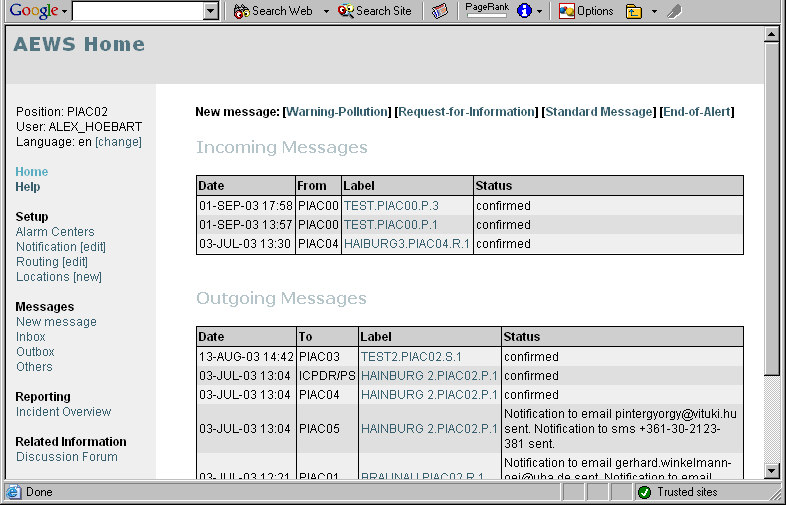
Current PIAC
and User
Setup PIACs,
Notifications,
Routing and
Locations
Write and read
Messages
Incident Reports
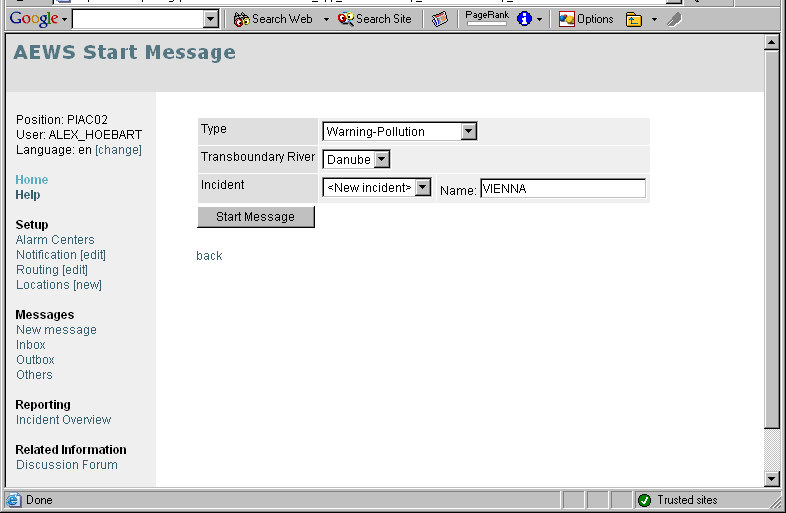
2) Selected Type
and River will
affect default
routing
3) Type in the
name of the
new incident
4) Continue to
Message Form
1) Start new
Message
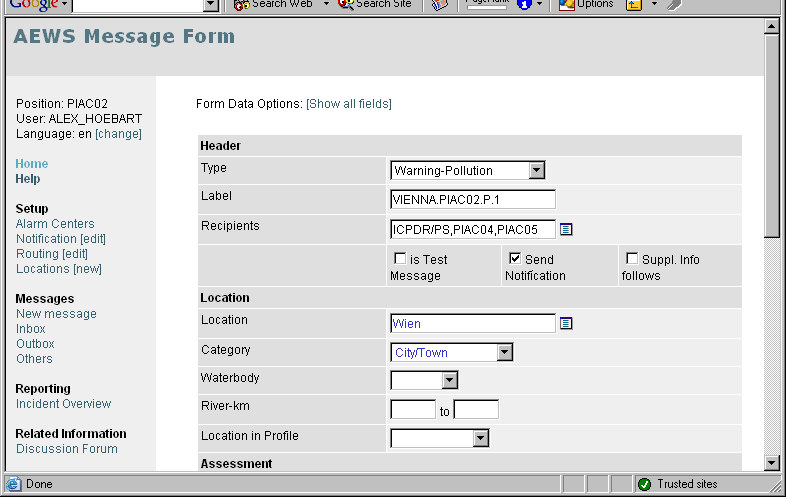
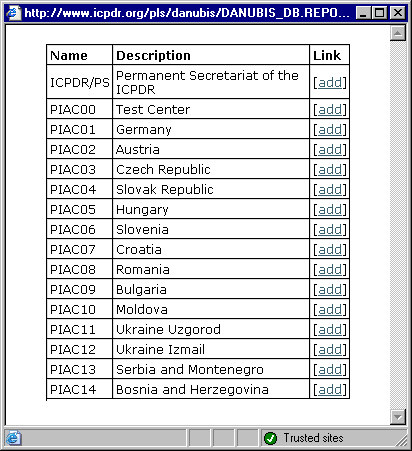
Label and
Recipients
pre-filled
Open PIAC
pick list
Add
recipients
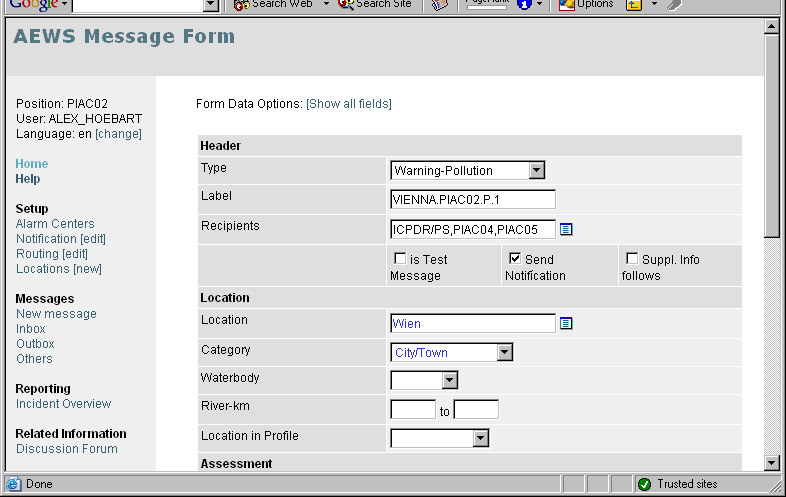
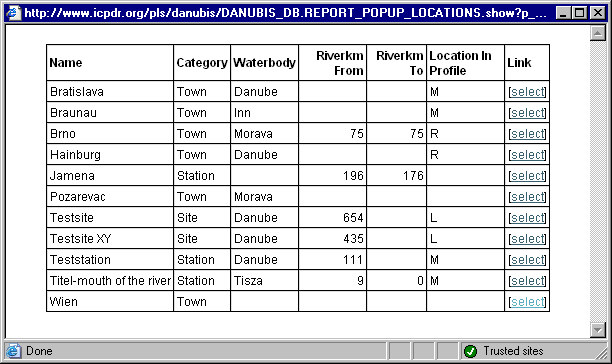
Select
location
Type in new
location
... or open
Location
pick list
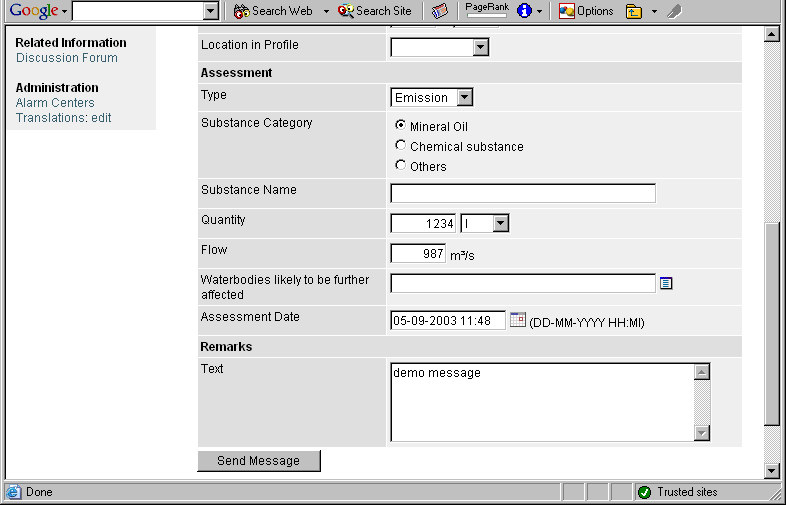
Fill in
short form
Submit
Message
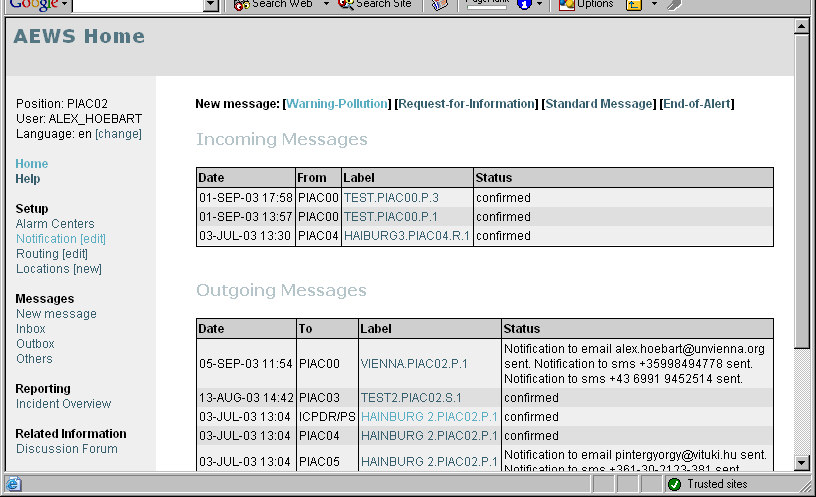
New outgoing
message
shows email
and sms
notifications
sent
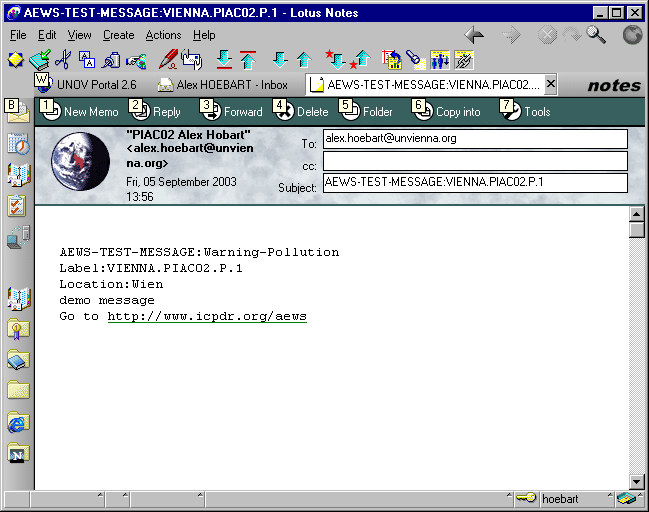
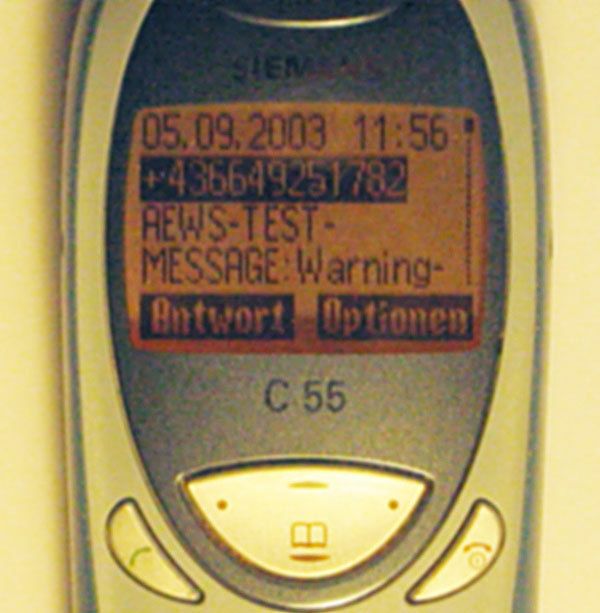
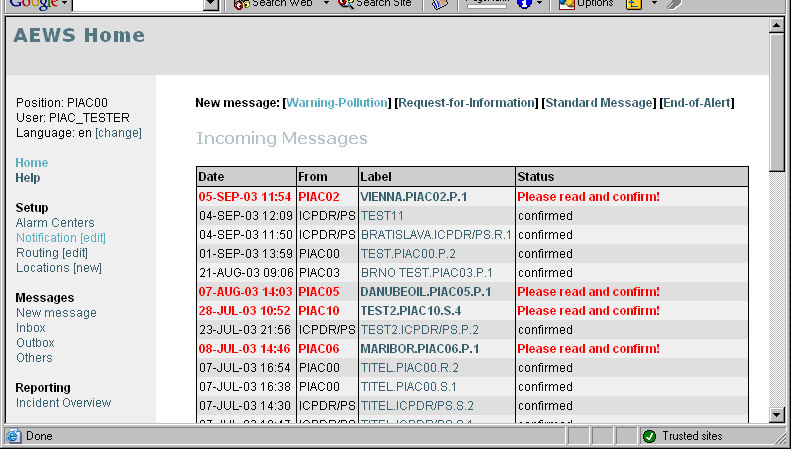
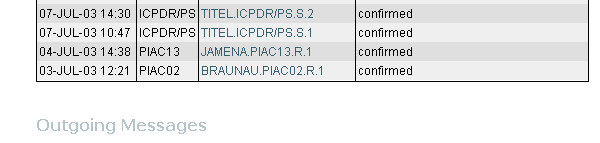
!
Recipient`s
view of new
message
Click to read
message
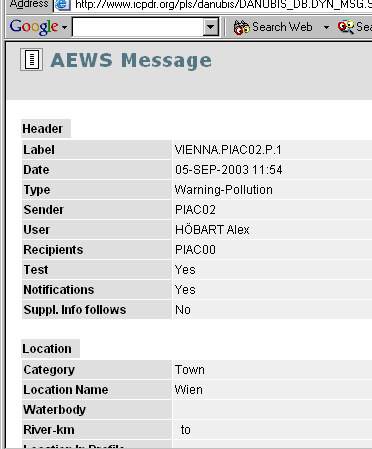
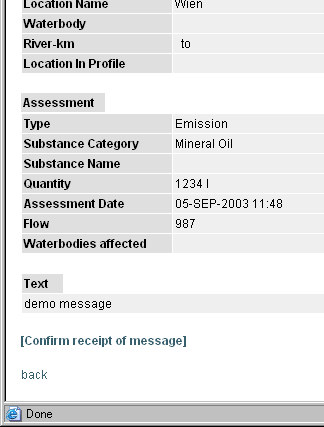
"
Confirm receipt
of message
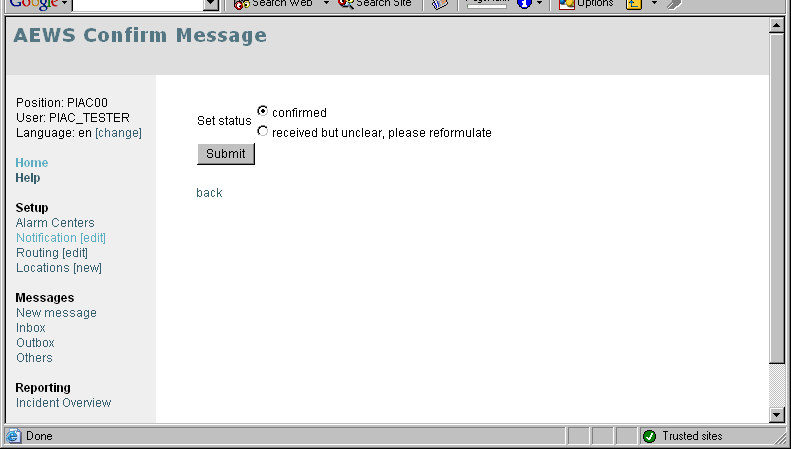
#
"
Submit
confirmation
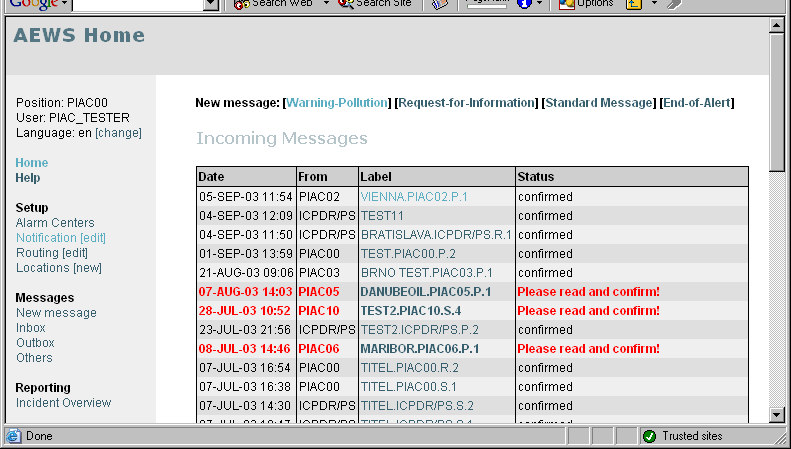
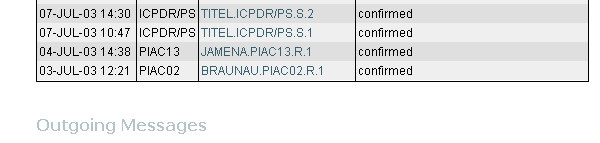
#
View of
confirmed
message
Further options:
ˇread,
ˇreply to sender or
ˇreply to all
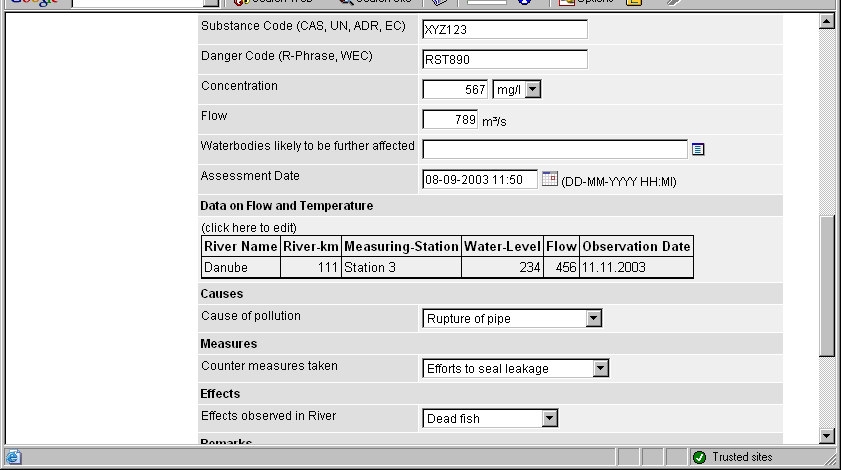
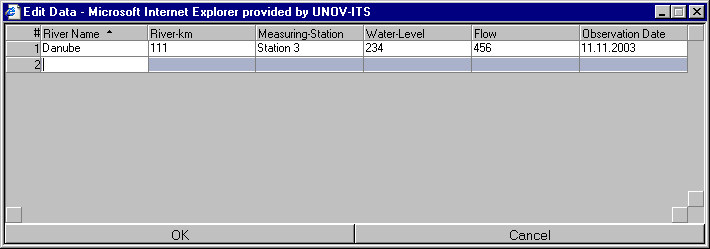
Click to edit data
for Danube Basin
Alarm Model
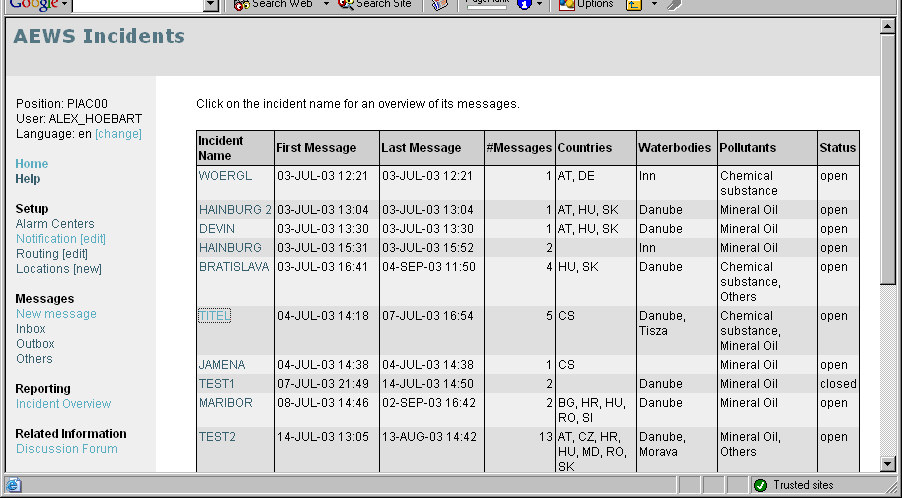
!
$ $ %
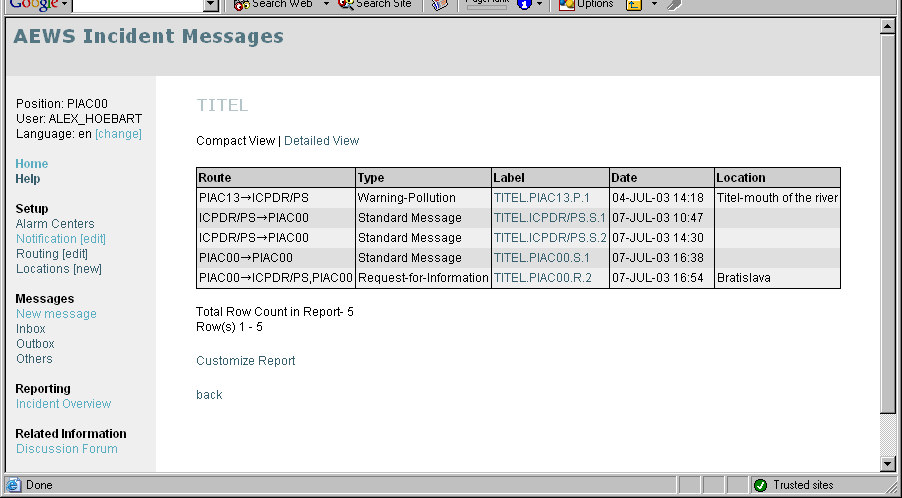
!
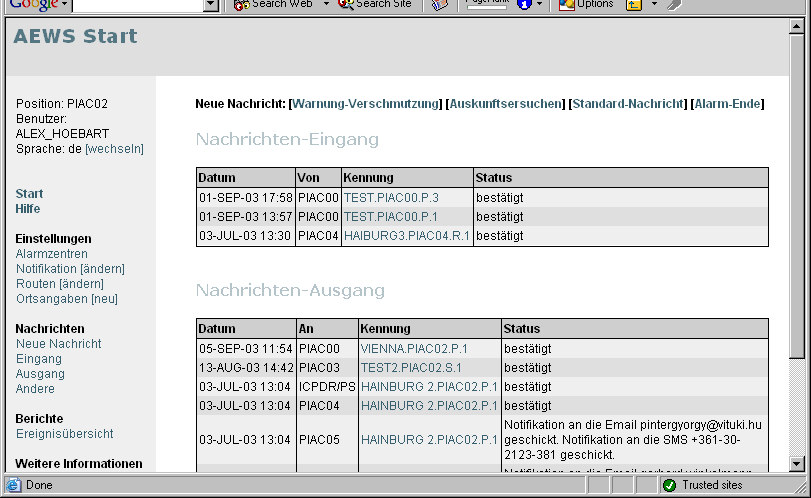
&
'
(